A BIN attack is card fraud in which attackers generate and test large numbers of card numbers that share one Bank Identification Number. Bots find the numbers that authorize; those cards are then used for purchases or sold.
BIN attacks: How they work and how to stop them
A BIN attack tests thousands of generated card numbers against your checkout. How the attack runs, the signals that reveal it, and the controls that stop it.
On this page
Thousands of payment attempts hit a checkout page in an hour. None of them come from customers. Bots are working through generated card numbers to find the ones that authorize, and every attempt costs the merchant a gateway fee whether it succeeds or not.
That is a BIN attack. The attacker takes one valid Bank Identification Number, the first six to eight digits of a card, and generates the remaining digits by the thousand. Bots then test the results against stores with weak payment controls. Each hit becomes a card that can be used or sold.
What is a BIN attack?
A BIN attack is automated card testing built on a known Bank Identification Number (BIN). The attacker generates candidate card numbers that share the BIN and tries to validate them through online payment systems.
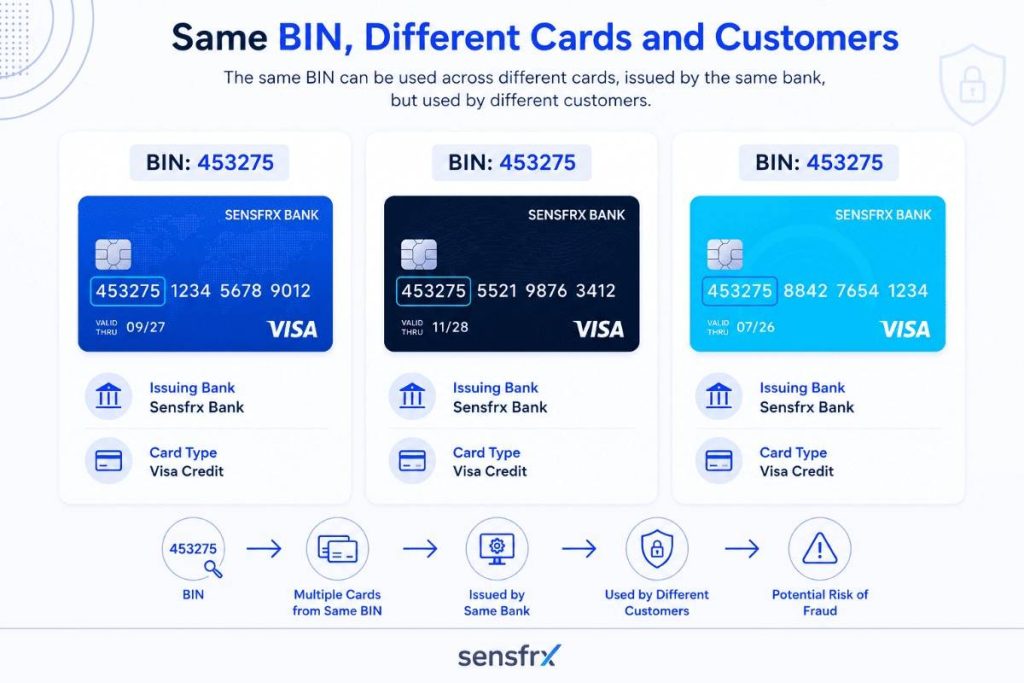
Nobody steals these cards one at a time. Card numbers follow a fixed structure, so once a BIN is known the attacker only has to guess the account digits and the check digit. That turns one BIN into millions of plausible card numbers.
Bots then test the numbers against merchants whose checkout or payment API tolerates repeated attempts.
The first goal is rarely a purchase. The bots are asking questions:
- Is the card active?
- Has it expired?
- Is the CVV right?
- Will the issuer authorize it?
- Does the merchant return error messages that give the answer away?
- Can this gateway absorb large-scale testing without noticing?
Once working cards are found, they are used to:
- Buy high-value goods.
- Buy gift cards or digital assets.
- Fund account takeover campaigns.
- Sell the validated cards on underground markets.
- Feed larger payment fraud operations.
A BIN attack is the first stage of a longer fraud operation, not the end of it.
What is a BIN?
The Bank Identification Number (BIN), also called the Issuer Identification Number (IIN), is the first six to eight digits of a payment card.
Those digits identify the issuer and carry the routing information the authorization step depends on.
A BIN can tell you:
- The issuer
- The card network
- The card type
- The country of issuance
- The financial institution
- Whether it is debit or credit
- Whether it is a business or consumer card
In the card number 453981 XXXX XXXX XXXX, the BIN is 453981. Payment gateways read it to route the authorization request to the right issuing bank.
Anatomy of a payment card number
A card number has three parts:
| Component | Purpose |
|---|---|
| BIN (First 6–8 digits) | Identifies the issuing institution |
| Account Identifier | Unique account number |
| Check Digit | Mathematical validation using the Luhn algorithm |
The BIN is public and follows a standard format, so the attacker only has to guess the account digits, not the whole number.
That cuts the search space from sixteen random digits to nine or ten.
Why BIN ranges matter to attackers
Issuers allocate BIN ranges in predictable blocks.
Knowing that a BIN belongs to a particular issuer lets an attacker generate large numbers of candidates that look like that issuer's real cards.
The numbers 4539811234567890, 4539816543781255, 4539819988776654 and 4539815678123499 share one BIN and differ only in the account digits.
Most generated numbers are invalid.
That does not matter at scale. Automation tests millions of combinations in hours, so a tiny hit rate still pays.
How BIN attacks work
The details vary, but most BIN attacks run through the same seven stages.
Each stage is a chance to break the attack. Catching reconnaissance, throttling automated testing or spotting the payment pattern early stops the attacker before anything is monetized, which is why the controls below sit at several points rather than one.
Stage 1: Reconnaissance
Attackers start by picking targets.
They look for:
- Ecommerce sites with few fraud controls
- Public payment APIs
- Checkout pages with no rate limiting
- Merchants that return detailed payment error messages
- Businesses selling digital goods or low-cost items
The ideal target lets them retry payments without tripping anything.
Stage 2: BIN discovery
Next they collect valid BIN ranges.
Sources include:
- Public BIN databases
- Previously compromised cards
- Data breaches
- Underground forums
- Dark web marketplaces
- Open-source intelligence
The BIN itself is not a secret. The hard part is finding the account numbers that go with it.
Stage 3: Card number generation
With a BIN in hand, the attacker generates thousands or millions of candidate numbers.
The generator:
- Creates account identifiers
- Calculates a valid Luhn check digit for each
- Outputs numbers that pass basic format validation
This takes seconds and needs no human input.
Stage 4: Bot automation
Nobody types these in by hand.
The bots used for testing can:
- Rotate IP addresses through residential proxies
- Mimic browser behaviour
- Randomize headers
- Spread requests across cloud infrastructure
- Slip under simple rate limits
- Retry failed requests selectively
A current bot framework submits thousands of payment attempts a minute while each request looks like an ordinary shopper.
Stage 5: Payment testing
The bots push low-value transactions through checkout pages or payment APIs.
Typical tests:
- $0 authorizations
- $1 verification charges
- Small digital purchases
- Donation forms
- Subscription sign-ups
- Gift card purchases
Low amounts draw less attention from fraud rules and are more likely to be authorized.
Stage 6: Validation
The gateway's responses do the attacker's sorting for them.
Response codes such as:
- Card valid
- Incorrect CVV
- Expired card
- Insufficient funds
- Do not honor
- Issuer unavailable
Even a decline is information. "Incorrect CVV" tells the attacker the card number is real and worth another pass.
Stage 7: Monetization
Validated cards are the product.
They are used to:
- Buy high-value merchandise
- Buy cryptocurrency
- Buy gift cards
- Sell on underground markets
- Run cash-out schemes
- Support other fraud such as account takeover or synthetic identity fraud
This is the point where the testing turns into losses.
Business impact of BIN attacks
Most merchants notice a BIN attack when the chargebacks arrive. By then the fraudulent purchases have shipped.
The fraud losses are only part of the bill:
| Impact | What It Means for Your Business |
|---|---|
| Chargebacks | Excessive chargeback ratios trigger higher processing fees, monitoring programs, and risk of merchant account suspension |
| Authorization fees | Every failed attempt costs money. Thousands of bot-driven requests add up fast |
| False declines | Overly aggressive fraud controls block legitimate customers, increasing cart abandonment |
| Operational load | Fraud investigations pull teams away from revenue-generating work |
| Brand reputation | Repeated payment issues erode customer trust and drive negative reviews |
| PCI DSS scrutiny | Ongoing fraud incidents can trigger compliance reviews and reassessment of payment security controls |
The cost merchants underestimate is authorization abuse. A large BIN attack can fire tens of thousands of payment requests in a few hours, and the gateway charges a fee for each one whether or not a single fraudulent order completes.
How to detect BIN attacks before they cause fraud
A single authorization attempt from a BIN attack looks like any other customer. The pattern only shows when hundreds or thousands of unrelated-looking transactions are read together.
Detection therefore means correlating several signals in real time.
1. Velocity monitoring
Velocity checks are the fastest way to see a BIN attack.
Watch for:
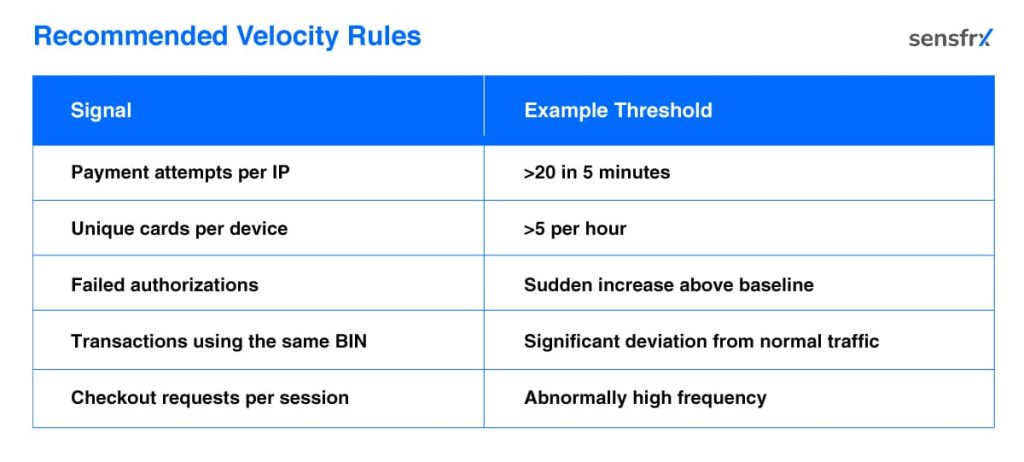
- Many payment attempts from one IP address within a minute
- Many different card numbers from the same device
- Repeated authorization attempts on the same BIN
- A sudden jump in failed transactions
- Several customer accounts sharing one device fingerprint
A store that normally sees 20 payment attempts a minute and suddenly receives 500 is under attack, even when each transaction on its own looks fine.
Recommended velocity rules
Set thresholds from your own normal traffic rather than fixed numbers. The image below shows a workable starting point:
2. Behavioral analytics
Behavioral analytics looks at how a visitor uses the site, rather than just what they submit.
Bots are consistent in ways people are not.
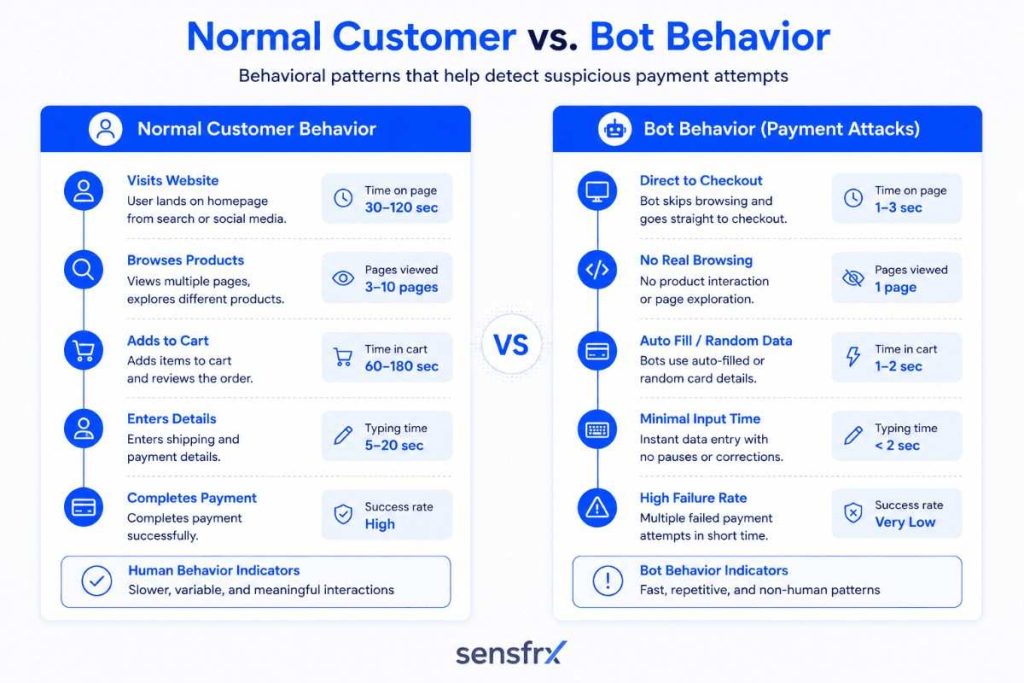
Tells include:
- Page navigation faster than a person can read
- Forms completed instantly
- No mouse movement
- No scrolling
- Uniform typing speed
- The same checkout sequence every time
- Identical browsing paths
A behavioural model learns what real customers do on your site and flags sessions that fall outside it.
That catches automated testing even when the attacker rotates IP addresses or spoofs the browser.
3. Device fingerprinting
IP addresses are cheap to change through VPNs and residential proxies. The device behind them is harder to disguise.
A device fingerprint combines attributes such as:
- Browser configuration
- Operating system
- Screen resolution
- Installed fonts
- Language settings
- Time zone
- Hardware characteristics
- Canvas rendering
- WebGL information
When the IP changes but the fingerprint keeps reappearing across transactions, you are looking at one operator, not many customers.
That links together attempts that would otherwise look unrelated.
4. Bot detection and automation analysis
Large BIN attacks run on automation, so detecting the automation detects the attack.
Bot management looks at:
- Browser integrity
- Headless browser markers
- Automation frameworks
- JavaScript execution
- Human interaction patterns
- Request timing
- Responses to browser challenges
Bots keep getting better at imitating people, so this layer needs updating as often as the attackers update theirs.
5. IP reputation and proxy detection
Not every IP address carries the same risk.
Check whether requests come from:
- Known malicious IP addresses
- Data centres
- VPN providers
- Anonymous proxy services
- Tor exit nodes
- Residential proxy networks
6. Geographic and transaction intelligence
Geography gives the attack away more often than attackers expect.
For example:
- Hundreds of payment attempts from countries where you have no customers
- One account logging in from several continents within minutes
- Rapid switching between unrelated regions
Context decides. One international order is normal. A surge of geographically inconsistent transactions is not.
7. Risk scoring
Rather than deciding on one rule, a fraud platform gives each transaction a risk score.
The score draws on signals such as:
- Device reputation
- BIN risk
- IP intelligence
- Velocity
- Behavioural analysis
- Email reputation
- Phone reputation
- Geographic consistency
- Past purchasing patterns
- Payment history
The image below shows one way to calibrate the score into allow, review and block bands:
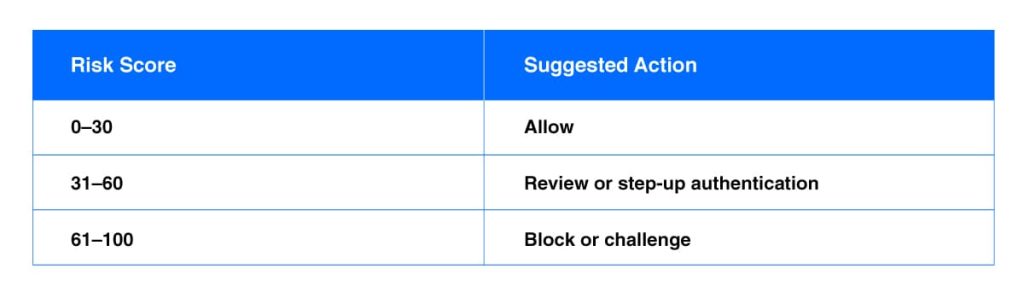
Scoring cuts fraud without the blanket declines that a single hard rule produces.
8. Payment API monitoring
Many BIN attacks go straight at the payment API and never load a web page.
Monitor the API for:
- Unusual request rates
- Repeated authorization failures
- Unexpected HTTP response patterns
- Invalid parameter combinations
- Token reuse
- Unfamiliar API clients
API logging and alerting show attack traffic that never appears in web server logs.
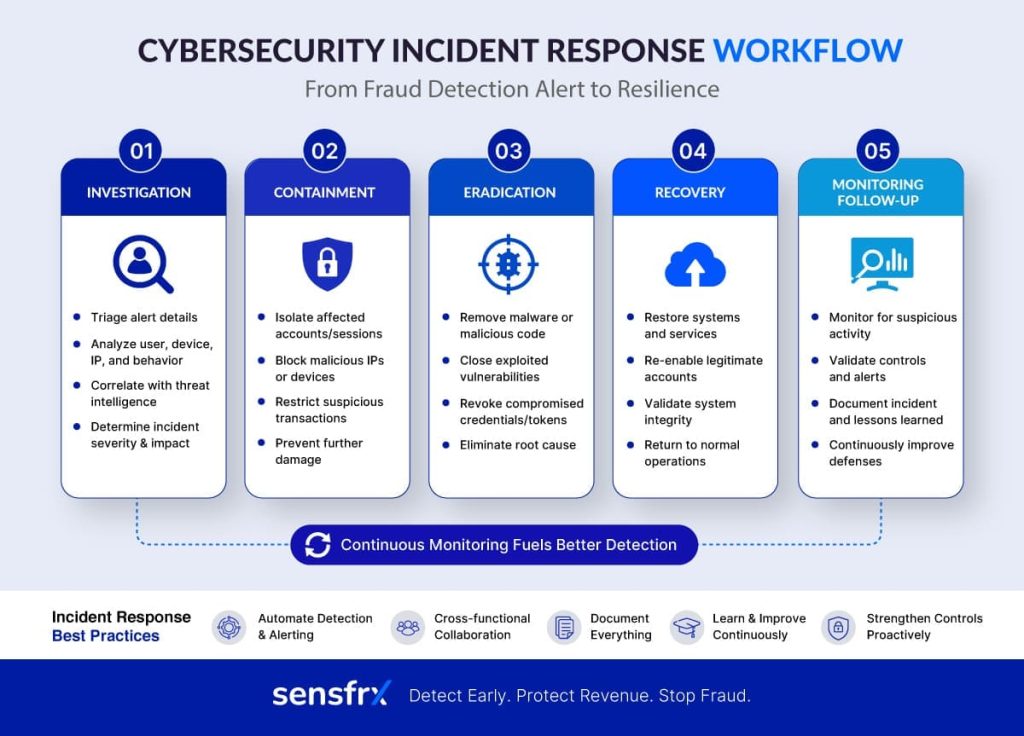
Incident response playbook for BIN attacks
Good controls lower the odds; they do not make a merchant immune. What separates a nuisance from a loss is how fast the attack is confirmed and contained.
A written response plan lets fraud, security, payments and engineering act together instead of in sequence.
Step 1: Confirm the attack
Before acting, rule out a sale, a campaign or a seasonal spike.
Signs that point to a BIN attack:
- A sudden rise in authorization requests
- Many attempts on the same BIN range
- High decline rates across different card numbers
- Many low-value transactions
- More CVV or AVS failures than usual
- Traffic from residential proxies, VPNs or cloud providers
- The same device fingerprints across several accounts
Two or three of these together is a confirmation. One on its own is not.
Step 2: Contain the attack
Once confirmed, limit the abuse while keeping checkout open for real customers.
Containment measures:
- Tighten rate limits on checkout and payment APIs.
- Raise fraud risk thresholds for the duration.
- Put CAPTCHA or bot challenges in front of suspicious traffic.
- Block the IP addresses and autonomous system numbers involved.
- Restrict high-risk geographies where that fits your business.
- Step up authentication, such as 3D Secure, for elevated-risk transactions.
- Tighten velocity rules on payment attempts.
The aim is to break the automated testing without turning away shoppers.
Step 3: Investigate the scope
Work out how far it went from payment logs, fraud alerts and infrastructure telemetry.
Questions to answer:
- Which BIN ranges were targeted?
- How many payment attempts were made?
- Were any fraudulent transactions approved?
- Which channels were hit (web, mobile, API)?
- Were customer accounts involved?
- Did the attacker use a specific weakness or misconfiguration?
Keep full payment and API logs. The root-cause work depends on them.
Step 4: Coordinate with payment partners
Tell the people who can help:
- Payment gateway providers
- Acquiring banks
- Card networks, where appropriate
- Fraud prevention vendors
- Internal finance and customer support teams
Gateways and acquirers often see the same attack across several merchants and can apply controls at the network level.
Step 5: Recover securely
When the malicious traffic drops off:
- Return fraud thresholds to normal gradually.
- Keep the extra monitoring on for a while.
- Review blocked transactions to catch false positives.
- Confirm every control is still working as expected.
Do not lift all the temporary restrictions at once. Attackers often come back as soon as the defences relax.
Step 6: Conduct a post-incident review
Every incident teaches something about your controls.
Write down:
- The timeline
- How it was detected
- What was done
- The financial impact
- The control gaps it exposed
- What to change
That record is what makes the next response faster.
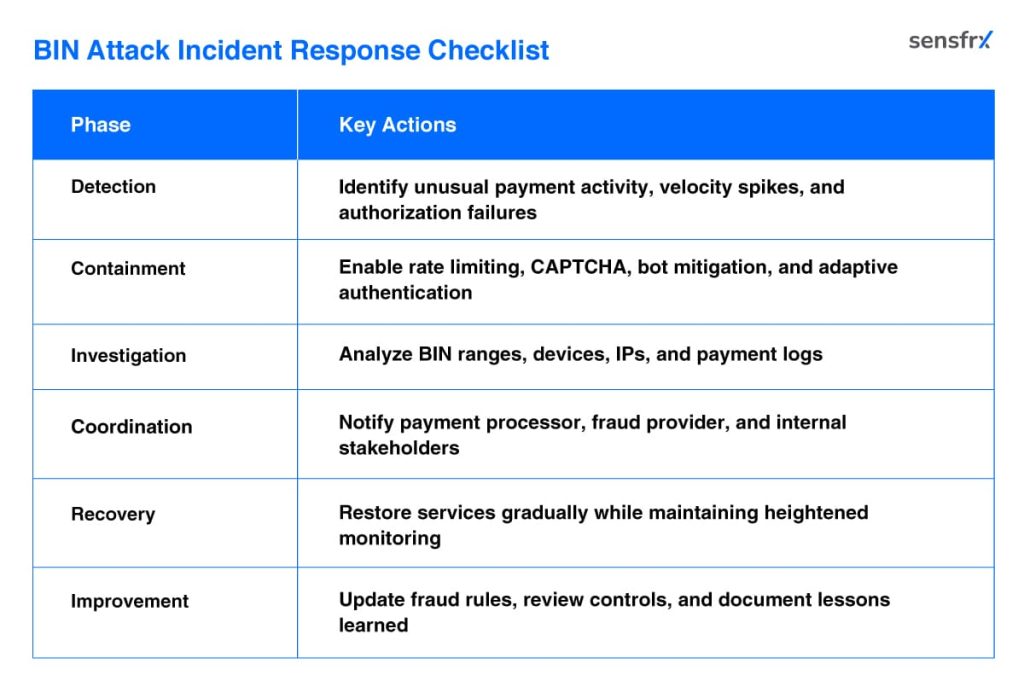
Summary of BIN attack response steps
The checklist below condenses the investigate, contain, recover and prevent phases into one page.
Merchant security checklist for BIN attack prevention
No single control stops BIN attacks. Attackers combine bots, residential proxies and automated tooling, so the defence has to combine payment security, bot mitigation, device intelligence, behavioural analytics and continuous monitoring.
The checklist below lists the practical steps for ecommerce, payments and security teams. Use it to score your current setup and pick what to fix first.
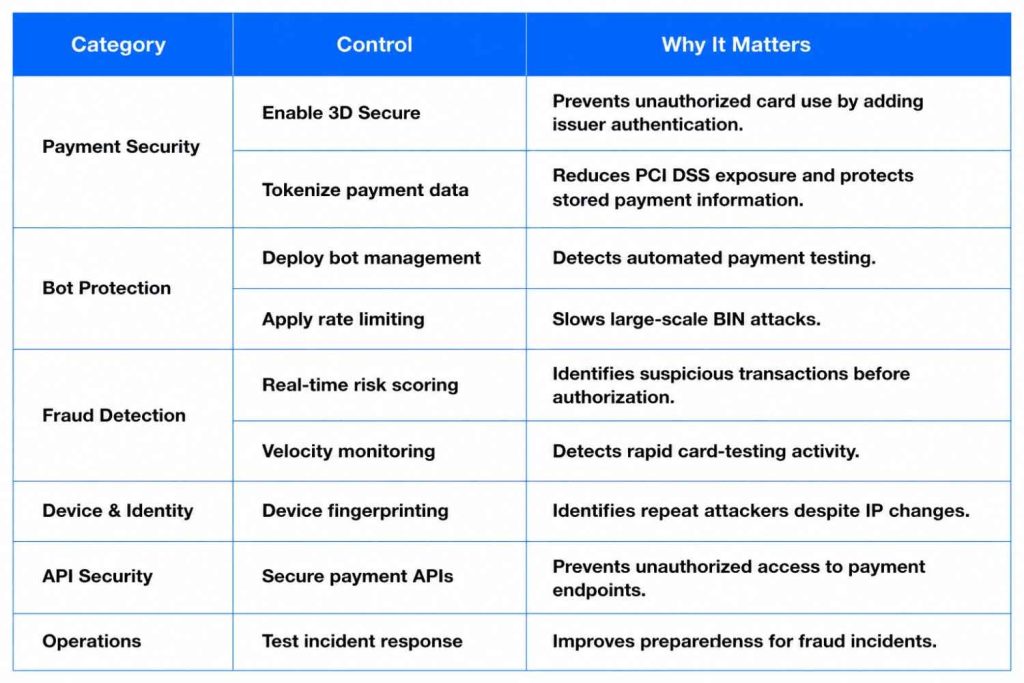
Together, these layers cut the success rate of BIN attacks sharply while real customers check out as before.
Where to start
If you do one thing this week, add velocity rules on authorization attempts per IP, per device and per BIN, and alert on decline-rate spikes. Those two signals catch most BIN attacks in their first minutes.
Then add device fingerprinting, bot detection and risk scoring so the decision moves from "block this IP" to "allow, challenge, review or block this transaction". Sensfrx does that scoring in real time across the signals described above.
To see how your checkout holds up against automated card testing, start a free trial and run it against your own traffic.