An attacker on a coffee shop's public Wi-Fi runs a packet sniffer and captures unencrypted logins, emails and card details from other users. It is passive, so it usually goes undetected, and it ends in identity theft or fraud.
Sniffing attacks: Techniques, tools and defenses explained
How sniffing attacks capture passwords and session tokens off a network, the tools attackers use, how to detect promiscuous-mode sniffers, and how to stop them.
 By 15 mins readPublished Updated
On this page
A sniffing attack captures data packets as they cross a network, and if those packets are not encrypted the attacker reads passwords, session tokens and card numbers straight off the wire. In one case covered by TechTarget, a researcher broke into 70% of the Wi-Fi networks in a local area with this technique.
What sniffing is
Sniffing is monitoring and capturing packets as they travel across a network. Network administrators do it every day with packet analysers to troubleshoot and measure performance. The same capture in an attacker's hands is a sniffing attack.
The difference is intent and consent. The admin captures traffic on a network they run. The attacker captures traffic on one they do not, and keeps whatever passwords, emails and card numbers pass through.
What sniffing attacks are
A sniffing attack is the interception of packets by someone who should not have them, on public Wi-Fi, in an office LAN, or anywhere else traffic is reachable.
The tool is a packet sniffer or network analyser. On an unencrypted network it exposes:
- Login credentials: usernames and passwords for any service that sends them in the clear
- Financial details: card numbers, bank account numbers, transaction data
- Private communication: emails, messages and anything else not wrapped in TLS
Why sniffing attacks matter
Captured data feeds identity theft, financial fraud and account takeover. Most communication now runs over networks at home, at work and in public places, so the exposure is constant.
Where sniffing happens: Public and enterprise networks
Open Wi-Fi in an airport or café is the obvious case. A customer logs in to their bank over the café hotspot, and an attacker on the same network captures the session if the site is not using HTTPS.
Corporate networks are exposed too when traffic is unencrypted or unmonitored. An insider plugs in a laptop and collects employee logins or customer data without anyone noticing.
The fix in both cases is the same: encryption (HTTPS, VPN) and a network configured so one device cannot see another's traffic.
How sniffing attacks work
Packets are captured in transit, usually without the sender or receiver knowing. Knowing where in the stack the capture happens tells you which defence applies.
Capturing packets on the network
Devices exchange data in small units called packets. A sniffer catches those packets as they pass. The analogy that holds up: a camera on the mailbox that photographs every envelope going by.
Network traffic layers (TCP/IP stack)
The TCP/IP stack has four layers, each with its own job in moving a message between devices. Attackers know how to peel back each layer to get at the data inside.
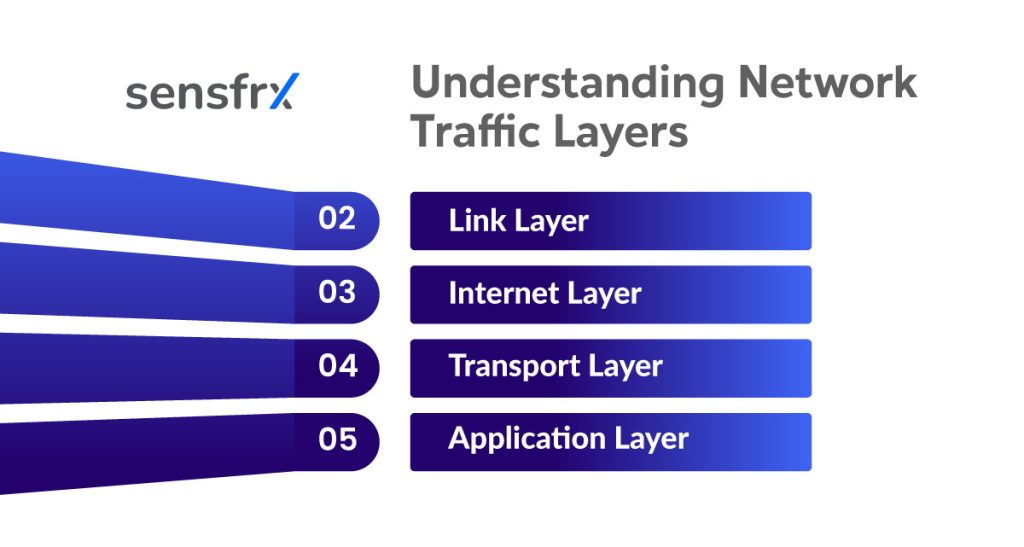
What each layer carries and what a sniffer takes from it:
1. Link layer (network interface layer)
Moves raw frames between directly connected devices, such as your laptop and the router, using MAC addresses.
- How sniffing happens: the attacker puts their network card in "promiscuous mode", so it accepts every frame on the segment rather than only its own
- What is exposed: MAC addresses, IP addresses, and full frames if the network is not encrypted
- Example: on open Wi-Fi the attacker sees everything every client sends, passwords included, if it is not encrypted
2. Internet layer
Routes data between networks, picking the path by IP address.
- How sniffing happens: the attacker reads IP packets to see where traffic comes from and goes to
- What is exposed: IP addresses, routing information, and the type of traffic (web, email, file transfer)
- Consequence: device tracking, network mapping, and traffic redirection through fake routes (man-in-the-middle)
3. Transport layer
Splits data into segments and delivers them in order over TCP or UDP.
- How sniffing happens: the attacker follows TCP headers to reconstruct conversations and learn which user is logged in and which ports are in use
- What is exposed: session IDs, port numbers, traffic patterns, and the session itself if it can be hijacked
- Example: with a captured session cookie the attacker logs in to the web app without a password
4. Application layer
Where the actual content lives: emails, web pages, chat messages, file uploads.
- How sniffing happens: without encryption (HTTP instead of HTTPS) everything is readable as sent
- What is exposed: credentials, emails, search queries, chat messages, files, form data
- Worst case: usernames, passwords and private messages in plain text
Each layer leaks something different, and together they give the attacker the whole picture. On a network with no VPN, no HTTPS and no segmentation, that collection happens without a trace.
What makes a network susceptible to sniffing
Three weaknesses do most of the damage:
- No encryption (HTTP instead of HTTPS): traffic between the user and the service travels in plain text, so anyone on the network reads credentials, messages and payment details with a basic sniffer
- No client isolation: devices on the same network see each other's traffic, so an attacker can scan for vulnerable hosts and capture or alter what they send
- No firewall or monitoring: nothing blocks unauthorised access and nothing alerts on suspicious activity, so sniffing, spoofing and theft go on in the background undetected
Environments most often targeted
The attacks cluster in three places:
- Open Wi-Fi in cafés, airports and hotels. Unencrypted, no password, anyone can join. A customer logs in to email over the café hotspot and an attacker on the same network captures the credentials with Wireshark
- Misconfigured office networks. VLANs are meant to isolate sensitive traffic; a misconfigured switch leaks it across segments. An intern on a general port reads HR payroll traffic because the HR VLAN is not isolated as intended
- Shared networks in apartments and dorms. Many users on one Wi-Fi or LAN with no client isolation. A student runs a packet sniffer and intercepts a neighbour's unencrypted banking session
Types of sniffing attacks
Three types, by method:
- Passive sniffing
- Active sniffing
- Protocol-based sniffing
Passive sniffing
The attacker connects to the network and listens. Nothing is sent, nothing is changed.
Why it is hard to detect: no transmitted data means no change in the network and nothing for an alert to fire on. It is reading over your shoulder without touching anything.
Example: on café Wi-Fi an attacker runs Wireshark and watches which sites you visit and what you send, and you never know.
Use in reconnaissance
Passive sniffing is mostly the information-gathering phase before an attack. An attacker watching DNS requests inside a company learns which systems employees use and picks the next target from the list.
Active sniffing
Active sniffing manipulates traffic to force it past the attacker. Switched networks send each packet only to its intended recipient, so the attacker injects packets or uses ARP (Address Resolution Protocol) spoofing to redirect traffic through their own device.
The two common techniques:
- ARP spoofing: the attacker sends fake ARP replies so that devices on the LAN believe the attacker's machine is the gateway. Employee computers send their traffic through the attacker's laptop, which reads logins, emails and the rest before forwarding it on
- MAC flooding: the attacker floods a switch with fake MAC addresses until it fails open and behaves like a hub, broadcasting all traffic to every port, including the attacker's
Risk escalation and triggered alerts
Because active sniffing changes the network, it causes side effects: slowdowns, duplicate IPs, odd device behaviour. Those side effects trip intrusion detection systems. A firewall or IDS that sees a burst of ARP replies or devices acting strangely will alert the IT team and expose the attack.
Protocol-based sniffing
This targets protocols that transmit in plain text: HTTP, FTP, Telnet. Anything sent over them is readable by whoever captures it.
- HTTP: a site without HTTPS sends your login form contents in the clear
- FTP: filenames, passwords and file contents are all visible
- Telnet: the remote-access username and password cross the network as typed. A developer uploading site files over FTP on open Wi-Fi hands the attacker the FTP credentials and, later, the server
Unencrypted credential capture
HTTP and Telnet do not hide login details, so a sniffer sees usernames and passwords as plain text. Log in to an old admin portal over http:// rather than https:// and the attacker has your exact credentials to reuse.
Tools commonly used in sniffing attacks
The same packet capture tools serve network analysis, troubleshooting and security monitoring. Administrators need to know them because attackers use them too.
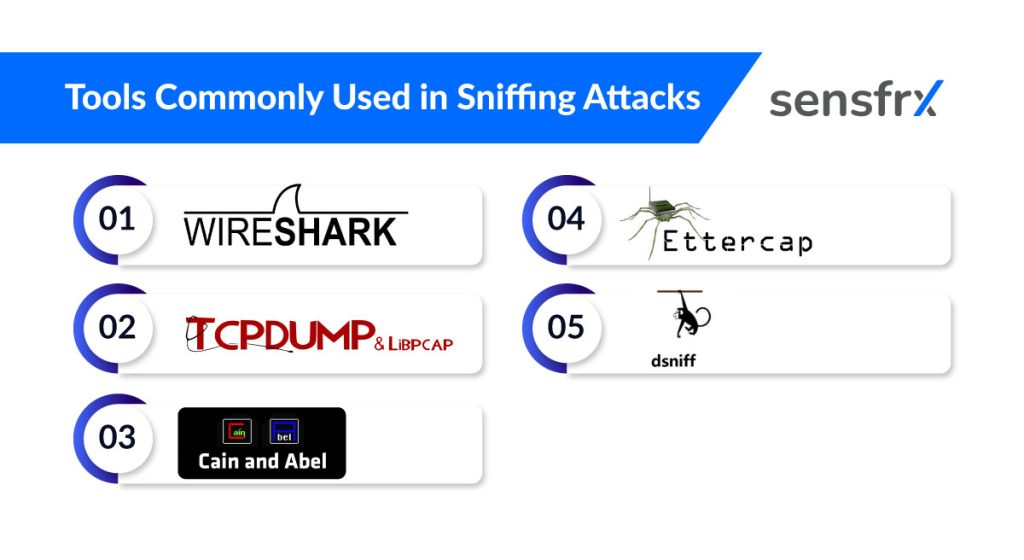
1. Wireshark
The best-known packet analyser, used by professionals and beginners alike. A graphical interface for capturing and analysing packets live or from saved files, with support for many protocols, colour-coding by packet type and filtering on any criterion.
2. Tcpdump
A command-line sniffer for Unix-like systems. It captures all traffic on a chosen interface and writes it to a file for later analysis in Wireshark or similar. BPF filter syntax captures only the packets you want, which keeps it workable on busy networks.
3. Cain and Abel
A Windows tool known for password recovery and ARP poisoning. It supports active sniffing, including man-in-the-middle attacks and credential harvesting, and shows up in penetration tests of Windows environments.
4. Ettercap
A suite for man-in-the-middle attacks on a LAN. It supports active sniffing, ARP spoofing and live traffic manipulation, with both command-line and GUI interfaces.
5. Dsniff
A set of network security tools that includes packet sniffing. Beyond capture, it reconstructs TCP/IP sessions in real time, which is how an attacker lifts passwords or session tokens out of live traffic.
Real-world scenarios and a case study
In 2007, TJX Companies Inc. (owner of T.J. Maxx and Marshalls) suffered one of the largest data breaches on record, affecting 94 million credit and debit card accounts.
The attackers parked outside a store with a laptop and an antenna, intercepted the Wi-Fi and broke its weak WEP encryption.
From the captured wireless traffic they took:
- Internal network access credentials
- Unencrypted payment card data
- Traffic between point-of-sale (POS) systems and servers
The breach cost TJX over $250 million in legal, financial and reputational damage.
What failed
- Outdated WEP encryption
- No network segmentation
- No monitoring for passive sniffing or rogue access
What to take from it
- Never run outdated wireless encryption (WEP, WPA)
- Encrypted traffic is still exposed if the keys are weak or leaked
- Passive sniffing is hard to detect, so run IDS tools and watch for unexpected traffic patterns
- Public-facing access points must be isolated from internal systems
Other scenarios
Public wi-fi sniffing (airports, cafés)
Attackers set up sniffers on open Wi-Fi in public places and take whatever users send: login credentials, emails, card details.
Corporate LAN sniffing during internal assessments
Security teams capture traffic on the company LAN during internal audits to find insecure protocols, misconfigurations and exposed data. It is a standard part of a risk assessment, and it finds the same things an attacker would.
Credential harvesting through unencrypted sessions
Attackers sniff HTTP, FTP or Telnet traffic and lift usernames and passwords in plain text. Legacy systems and poorly secured apps are the usual source.
Ethical hacking simulations using packet sniffers
Certified ethical hackers use sniffers in authorised penetration tests to find the exposure before an attacker does, and the findings go into hardening the network.
Detecting sniffing activity
Passive sniffing leaves no obvious trace, so detection depends on the right tools and on behavioural monitoring that notices when the network behaves differently.
Signs you are being sniffed
Passive sniffing generates no traffic, so the signs are indirect:
- Unexpected network slowdowns
- Duplicate IP or MAC addresses
- Devices responding to traffic not addressed to them (a sign of promiscuous mode)
When those appear, investigate with network monitoring and intrusion detection tools: Wireshark, ARPwatch, Nmap, Snort or Suricata. They show you the sniffing behaviour, point to the compromised device and let you act before data leaves.
Network scanning tools for packet monitoring
Wireshark, Tcpdump and NetFlow analysers show you the traffic flow.
- Capture live packets and look for unusual traffic patterns
- Validate encryption, find cleartext credentials, and spot traffic mirrored to unknown devices
Intrusion detection systems (IDS)
Snort, Suricata and Zeek watch the network for suspicious activity.
- They detect known sniffing signatures such as ARP spoofing attempts and DNS poisoning
- With alerts wired up, they catch the sniffer before it does damage
Signature-based against anomaly-based detection
Signature-based IDS
Matches traffic against a database of known attack patterns: a specific ARP poisoning script, a known sniffing tool.
How to implement: deploy Snort or Suricata and keep the signature databases updated.
- Pro: accurate on known attacks, with low false positives
- Con: blind to new sniffing techniques that match no signature
Anomaly-based IDS
Watches network behaviour and flags what deviates from the baseline: a traffic spike, a device switching to promiscuous mode.
How to implement: run Zeek (formerly Bro) or OSSEC and train them on the network's normal patterns over time.
- Pro: catches novel and zero-day sniffing
- Con: false positives if the baseline is poorly trained or the network changes legitimately
Run both for full coverage.
How to prevent sniffing attacks
Sniffing steals what crosses the network unprotected. Defence works at both the network level and the user level.
Encrypt all communication (HTTPS, SSH, VPN)
Use HTTPS, SSH and VPNs for everything in transit. Sniffed packets are then unreadable, which is the single most effective block on credential theft and data leakage.
Network segmentation and VLAN isolation
Split the network into isolated VLAN segments. A sniffer on one segment then sees only that segment, which limits both the reach and the damage.
Secure authentication protocols
Use Kerberos or OAuth so passwords never cross the network in plain text. Credentials stay protected even over untrusted networks.
Detect and block promiscuous mode
Promiscuous mode lets a card capture every packet, not just its own. Use intrusion detection to find devices in that mode and cut them off, so a rogue sniffer cannot sit and listen.
Educate users about public wi-fi
- Train users not to handle sensitive data on open or public Wi-Fi
- Push VPN use when remote or on unknown networks
- Most accidental exposure is a user on the wrong network
Best practices for teams and organisations
Technical controls and staff behaviour have to line up. Six practices cover most of it.
Secure network architecture reviews
Review the network design on a schedule: how devices connect, where traffic flows, what is exposed.
- Have security staff assess the layout for weaknesses
- Look for flat networks, insecure devices and unnecessary access points
- Document changes and update the design to keep segmentation and encryption in place
Enforce secure protocols across services
Every service should use an encrypted protocol: HTTPS for web, SFTP instead of FTP.
- Disable outdated and insecure protocols on servers and applications
- Apply settings consistently with configuration management such as Ansible or Puppet
- Audit ports and services on a schedule to confirm encryption is in place
Run periodic VAPT for sniffing exposure
Run Vulnerability Assessment and Penetration Testing (VAPT) at regular intervals.
- Have ethical hackers simulate sniffing attacks inside the network
- Check for exposed credentials, unencrypted traffic and misconfigured devices
- Patch what they find
Monitor for ARP and MAC anomalies
Suspicious ARP changes and MAC spoofing are the signatures of active sniffing.
- Alert on multiple IPs mapping to one MAC, or the reverse
- Run an IDS such as Snort or Suricata
- Isolate compromised devices from the network at once
Apply least privilege to network tools
Only trusted network admins should be able to run packet capture tools such as Wireshark and tcpdump.
- Set roles and permissions so not everyone can install or run a sniffer
- Log every use of these tools and audit the logs
- Back it with endpoint monitoring and policy enforcement
Where to start
Sniffing attacks capture passwords, emails and financial data without immediate detection, and the result is a breach, identity theft, or a compliance failure.
Encryption (HTTPS, VPN, SSH) and segmentation stop most of it, but no single control stops every variant. Layer them, because attackers will find the weak configuration or the one unencrypted segment.
Keep the monitoring on. Real-time detection is what turns a silent capture into an alert.
Sensfrx does not stop a packet capture, but it scores the login that follows. A credential lifted off the wire and replayed from a new device or network is flagged before the account is used. [See how Sensfrx scores risk](/).