Unauthorised access to customer or business data. It costs money directly, damages the brand and brings legal penalties.
How to protect an ecommerce site from data breaches
What an ecommerce breach costs, six ways attackers get in, a security checklist, the compliance rules that apply, and what to do first after a breach.
 By 11 mins readPublished Updated
On this page
An ecommerce data breach is someone getting at customer or business data they should not have: card numbers, addresses, logins, order history. The direct bill is forensics, card reissue and fines. The larger bill is the customers who do not come back.
The numbers are large. Breaches exposed 15 billion records in 2019. IBM's 2025 Cost of a Data Breach report put the average cost of one breach at $4.44 million. On top of that sit GDPR, CCPA and PCI DSS, each with its own penalties. Here is how breaches happen, what they cost, and the checklist that stops most of them.
What a breach costs
The damage outlasts the incident. Verizon's Data Breach Investigations Report has tracked the same pattern year after year: stolen credentials, third parties and unpatched software do most of the work. A few recent incidents show the range.
None of these are online stores, but every one of them started with a weakness a store can have too.
- PowerSchool (breached December 2024): 62.4 million US and Canadian K-12 students and 9.5 million teachers. Social security numbers, medical and special-education records stolen. A ransom was paid, and schools were still being extorted months later.
- Bank Sepah, Iran (March 2025): 42 million customer dossiers, around 12 TB, including military loan files. The "Codebreakers" gang demanded $42 million in Bitcoin.
- 23andMe: 7 million genetic and ancestry profiles scraped through credential stuffing. The company agreed to a $30 million compensation fund.
- UNFI, the Whole Foods supplier (June 2025): a cyber-attack took North American grocery ordering offline for a week.
- NationsBenefits: 3 million US health-plan members' health data stolen by the Clop ransomware group through a GoAnywhere MFT flaw.
For a small store, one 2025 estimate put the direct cost of a breach at $120k to $180k for a 50-employee shop, covering forensics, card reissue and fines.
- The same estimate had 42% of breached retailers losing more than 10% of annual revenue to customer churn within 12 months.
Reputation
A breach tells customers you cannot be trusted with their data. Some of them leave and do not return, and no discount code brings them back.
Legal exposure
GDPR fines scale with the offence; the €1.2 billion fine against Meta in 2023 is the high-water mark. Class actions from affected customers follow the regulator.
Six ways attackers get into an online store
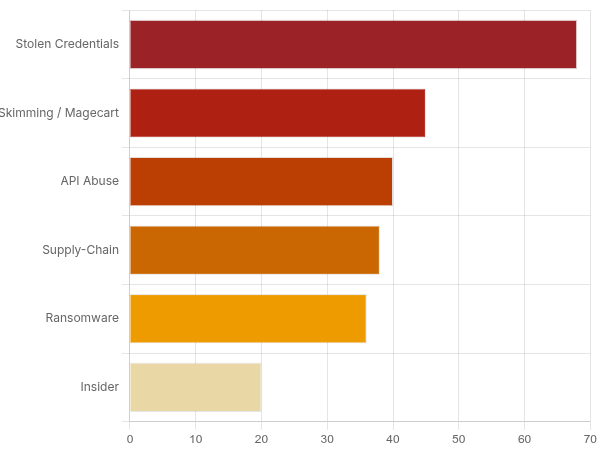
Most ecommerce breaches come through one of six doors.
1. Phishing and credential stuffing. A phishing email gets an employee's login. Credential stuffing replays logins leaked from other breaches against your admin panel and customer accounts. One estimate puts 40% of malware attacks as starting from an email link.
2. E-skimming. Attackers inject code, Magecart being the best known, into the checkout page and copy card data as the customer types it. The store never sees anything wrong because the payment still goes through.
3. SQL injection and cross-site scripting. Both abuse flaws in the site's own code, and both are common on WordPress and Magento stores with old plugins:
- SQL injection (SQLi) sends crafted input that the database runs as a query, exposing or altering records.
- Cross-site scripting (XSS) runs the attacker's script in a customer's browser, where it can steal sessions or card details.
4. API abuse. Stores now run on connected services, and an API with weak authentication or no rate limit hands an attacker the same data the front end can reach.
5. Ransomware. Attackers encrypt the data the business runs on and charge for the key. In 2022, 36.4% of enterprises reported being hit through a third-party system compromised by ransomware.
6. Insiders. Not every breach comes from outside:
- Mistakes, such as a database or export left open.
- Staff who leak or misuse data on purpose.
Finding the problem before an attacker does
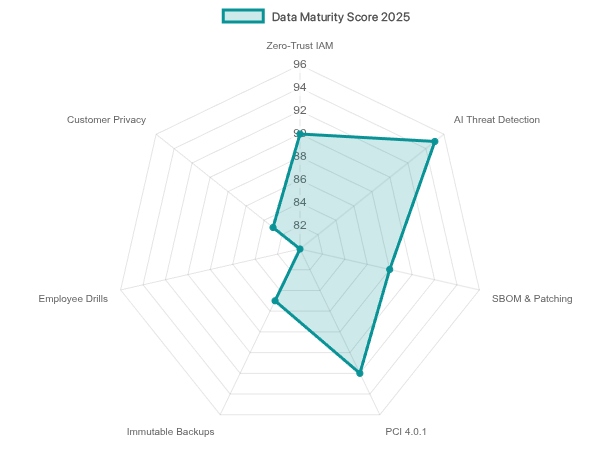
Regular testing and monitoring find weaknesses while they are still cheap to fix.
Penetration testing and security audits
A scheduled penetration test has someone attack the store the way a criminal would, and it turns up the usual suspects: unpatched Magento or WordPress, exposed admin panels, misconfigured security settings. A security audit checks the configuration and process around them.
Warning signs in account and device activity
Logins from places your customers do not live, repeated failures from one IP, and sudden traffic spikes are the early signs. A traffic spike without a marketing reason is often credential stuffing by bots or a DDoS attack.
Tools for threat detection
A SIEM collects logs from across the infrastructure and raises alerts on suspicious activity. An IDS/IPS watches network traffic for known attack patterns and can block them. Behavioural analytics learns what normal user and admin activity looks like and flags the deviations.
How long breaches go unnoticed
IBM's 2022 report put the average time to detect a breach at 207 days. That is seven months of access for the attacker. Cutting that dwell time is the main job of any monitoring programme.
What recovery looks like
IBM's later report found 65% of breached organisations were still dealing with the aftermath, while 35% said they had fully recovered, almost three times the previous year's 12%. The same report recorded the fastest find-and-contain times in nine years. Faster detection and faster recovery go together.
The ecommerce security checklist
Defence in depth: several ordinary controls, each of which catches what the others miss.
Website infrastructure
- Encrypt all traffic between customers and your server with SSL/HTTPS. 86.1% of websites already do.
- Pick a host with DDoS protection, a firewall and two-factor authentication on the hosting account, and turn the 2FA on.
- Put a web application firewall (WAF) in front of the store to stop SQL injection and XSS traffic before it reaches the application.
Authentication and access control
- Require multi-factor authentication for every admin user and offer it to customers.
- Use role-based access control and least privilege: staff get the data and systems their job needs and nothing else.
- Set password complexity rules and cap failed login attempts to blunt brute-force attacks.
Software and plugin maintenance
- Keep the platform (Magento, Shopify, WooCommerce), themes and plugins on current versions.
- Automate patching so a fix is applied as soon as it is released, not at the next quarterly review.
Payment processing
- Meet PCI DSS; it is mandatory for anyone handling card data.
- Use a payment gateway that tokenises card data so full card numbers never touch your servers. This cuts both your risk and your compliance scope.
- Run AVS and CVV checks on every card payment.
Data protection and storage
- Encrypt sensitive data at rest in the database and on the server.
- Never store full card numbers. Let a compliant gateway such as PayPal or Stripe hold them.
- Back up to a separate, access-restricted location and test the restore.
Monitoring and threat detection
- Run IDS/IPS and SIEM tooling with real-time alerts.
- Alert on repeated failed logins, large data transfers and access from suspicious IP ranges.
Staff training and insider risk
- Train staff to recognise phishing and follow the security basics; most breaches start with a person.
- Keep admin privileges rare and audit what privileged accounts do.
Customer privacy and trust
- Publish a plain privacy policy that says what you collect and why, in line with GDPR and CCPA.
- Give customers control over their data through consent management.
- Tell customers to use strong, unique passwords and to expect phishing that uses your name.
Advanced measures
Once the basics are in place, penetration testing and red teaming go past automated scanning by having skilled people try to break in. A bug bounty programme pays outside researchers to find and report flaws before criminals do.
Machine-learning fraud detection scores transaction patterns in real time and catches fraud that static rules miss. Zero Trust architecture treats every access request as untrusted until verified, whether it comes from inside the network or outside.
The rules that apply
Several laws and standards govern how a store handles customer data. Each has its own scope.
PCI DSS
The Payment Card Industry Data Security Standard is mandatory for any business that handles card data. The card brands (Visa, Mastercard, American Express and others) set it up to cut card fraud. It has 12 requirements covering a secure network, protection of cardholder data, and regular testing and monitoring. Fall out of compliance and you face fines and can lose the right to take card payments.
GDPR and CCPA
Both laws give individuals control over their personal data, with one important difference in how consent works.
- GDPR (General Data Protection Regulation) protects EU residents and applies to any organisation that handles their data, wherever it is based. It requires explicit consent for data collection, timely breach notification, and gives individuals the right to access, correct and erase their data. Fines are large.
- CCPA (California Consumer Privacy Act) protects California residents. It aims at the same transparency and control but works on opt-out for data sharing, where GDPR requires opt-in consent.
US state breach notification laws
Every US state has its own law on notifying people when their personal data is breached. These sit alongside federal law and broader state laws such as the CCPA, and each state sets its own terms:
- who must be told (individuals, the state attorney general, consumer reporting agencies);
- what counts as a breach and which data types trigger notification;
- when and how the notice must be delivered.
Why compliance pays
Beyond avoiding fines and lawsuits, visible compliance tells customers you take their privacy seriously, and that shows up in trust and retention.
Three practical steps
To get and stay compliant:
- Map where customer data flows.
- Document your compliance processes.
- Get legal advice, especially if you sell across jurisdictions.
Incident response and recovery
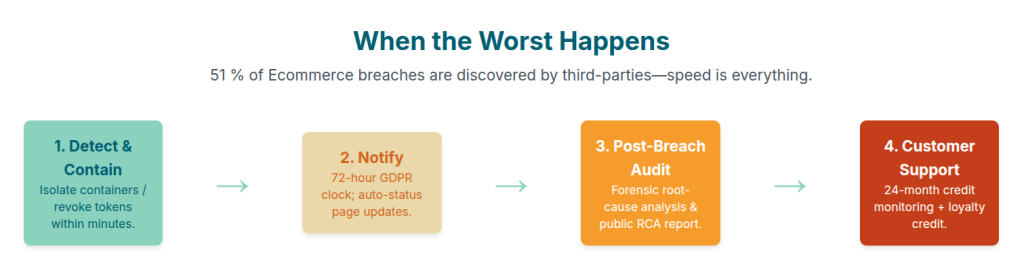
No defence holds every time. Write the response plan before you need it.
Breach response steps
- Detect and contain. Find the breach and isolate the affected systems before anything else.
- Communicate. Notify customers, stakeholders and regulators as the law requires. Pre-drafted templates save hours when it matters.
- Report. Meet the reporting deadlines under GDPR and the state laws that apply to you.
- Audit. A forensic investigation finds the root cause so the fix is real, not cosmetic.
- Recover. Run the disaster recovery plan: restore from clean backups and get the store trading again.
- Support customers. Offer free credit monitoring or identity theft protection to those affected.
Keeping it current
Security is a process, not a project.
- Track time to detect, patch compliance rate and customer trust scores so you can see whether the programme works.
- Schedule recurring vulnerability scans and audits.
- Read threat intelligence from industry reports, conferences and government alerts.
- Update defences as attacks change, including AI-written phishing that no longer reads like phishing.
Where to start
Protecting a store takes layers: technology (encryption, a WAF, a SIEM), people (staff training, customer education) and compliance (PCI DSS, GDPR, CCPA). None of the three covers for the other two.
Do not wait for a breach. Walk the checklist above against your own store this week, fix the gaps in order of exposure, and put fraud scoring on checkout so a stolen card or stolen login is caught before it becomes your incident.
FAQ