IP and browser signals that catch account takeover
Seven login signals Sensfrx scores from IP and browser data: fast geolocation, time zone and phone mismatches, old browsers, Tor exits and disabled cookies.
On this page
What an IP address tells you about a login
Every signup, login and payment arrives from an IP address, and that address is the first thing a fraud system can check before the user has done anything else. It gives you a country, a time zone, a network owner, and whether the address is a known proxy, Tor exit or botnet member. Attackers know this too, so they spoof addresses, spread traffic across botnets and hop between locations to blend in.
Why IP checks alone are not enough
IP addresses change hands and attackers work around static blocklists, so a reputation lookup on its own misses a lot. The stakes are large: in September 2018, Facebook disclosed a breach that exposed the personal information of nearly 50 million users. The attackers chained three software flaws in Facebook's systems and could have gained access to apps such as Spotify, Instagram and hundreds of others [1]. Four problems make IP-based detection hard:
- IP spoofing hides the real source address, so the address you log may not be the one the attacker sits behind.
- Botnets spread one attack across thousands of compromised devices, each with its own address, so no single IP trips a rate limit.
- Attackers hop between locations through proxies and VPNs to defeat geolocation rules.
- Many ISPs assign addresses dynamically, so the same IP belongs to different people on different days and a block aimed at one user hits the next.
How Sensfrx scores IP risk in real time
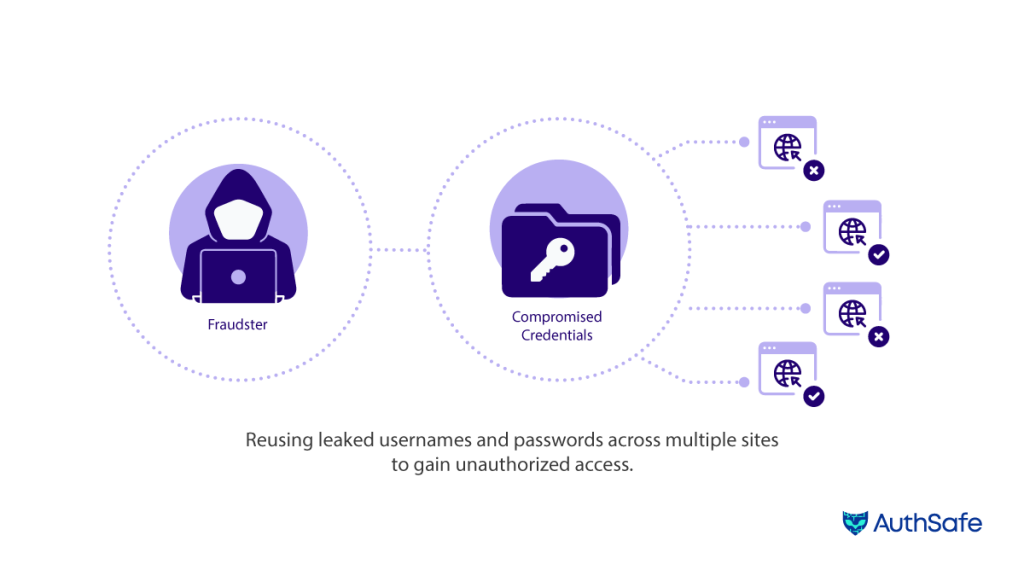
Sensfrx treats the IP address as one input among the device, network and behaviour signals it scores on every event. The IP side works like this.
An IP reputation database flags known malicious addresses and suspicious geolocations. Lookups run against a radix tree in the GraphCE package the Sensfrx team built, so the check adds little to login latency. Sensfrx also builds a baseline of how each legitimate user and device behaves. Deviations from that baseline, such as a sudden geolocation jump or an unusual traffic pattern, raise the score.
Behaviour analysis and threat intelligence help spot devices that belong to botnets or take part in coordinated attacks. Each signal below raises an event with a score, and your rules decide whether the final score means allow, review or block.
IP signals: Location and time zone
FastGeoLocation: A user who moves too fast
Every event carries a location and a timestamp. Put two of them side by side and you can work out how fast the account moved between them. A real person cannot be in two countries twenty minutes apart; a stolen session or a shared credential can.
FastGeoLocation does this calculation on every event:
- It takes the distance between the last two logged locations and the time between them, and computes the implied speed.
- If the speed is above a critical threshold, it raises a Fast Geolocation (FG) event.
- The event means the account's location changed faster than travel allows, which points to a login by a second party or an attempt to spoof location.
- The check runs in real time on each new log entry, so the flag lands on the login that caused it, not in a nightly batch.
MismatchedIPTimestampTZ: IP time zone against device time zone
Each event records the IP address and a timestamp, and the timestamp carries the time zone the client reports. The IP address also maps to a time zone. For an ordinary user the two agree.
MismatchedIPTimestampTZ compares them:
- It looks up the time zone of the IP address and checks it against the time zone in the timestamp.
- If they disagree, it raises a Mismatched IPTZ (MITT) event.
- The check runs in real time, so the mismatch is scored on the event where it appears.
What the mismatch catches
A device whose clock says one region while its network says another is the signature of a proxy, a VPN or a remote session. The signal helps in three cases:
- Someone using a victim's credentials from another region while routing through an address that looks local, or the reverse.
- Phishing kits and fraud tooling that relay logins through infrastructure far from the device that typed the password.
- Early warning: because the check runs on the login itself, you can hold the session for review before the attacker does anything with it.
Phone and browser signals
MismatchedIPPhoneLocation: IP country against phone country
When a signup or login includes a phone number, the number's country code is one more thing to compare with the IP address. The algorithm works in five steps:
- It runs only on "register succeeded" and "login succeeded" events, and it skips any event that carries no phone number.
- It also skips events with no IP address.
- It resolves the IP address to a country through external geolocation services and reads the phone number's country code with the phonenumbers library.
- If the two country codes differ, it raises a MismatchedIPPhoneLocation (MIPL) event.
- The check runs in real time, so the mismatch is scored on the signup or login where it occurs.
What the mismatch catches
Phone numbers are harder to fake than IP addresses, which makes the comparison useful:
- A signup whose phone number and IP address sit in different countries is worth a second look before the account gets a free trial or a saved payment method.
- On a login, a country mismatch the account has never shown before suggests someone other than the owner holds the credentials.
- Combined with FastGeoLocation and the time zone check, it gives you three independent reads on where the user is, and an attacker has to fake all three consistently.
Browser signals and account takeover
The browser is where the session lives, so what the browser reports about itself is worth scoring. An outdated version, a Tor exit address, disabled cookies or a screen size nobody uses are each weak on their own. Together with the IP signals above, they separate a customer on their usual laptop from a script, a stolen session or an attacker's rig.
Sensfrx reads these browser attributes on login and logout events and scores them with four signals.
- OldBrowserVersion flags clients running a browser build behind the current release for their operating system.
- TorBrowser flags traffic from known Tor exit nodes.
- DisabledCookies flags logins and logouts where the client has cookies switched off.
- UnpopularScreenResolution flags screen sizes outside the common set for the device type.
None of these decides a case alone. Each raises an event with a score, and the score feeds the same rules as the IP signals.
OldBrowserVersion: A browser behind the current release
Users on old browser builds are easier to compromise, and attack tooling often reports versions real users stopped running long ago. OldBrowserVersion works like this:
- On login and logout events it reads the browser name, browser version and operating system from the request.
- It compares the version with the latest supported version for that operating system, kept in a database Sensfrx maintains.
- If the version is outdated, it raises an OldBrowserVersion (OBV) event with a score set for the severity of the detection.
- The check runs on every event, so a browser that falls behind after the first login is still caught.
What an old version tells you
Three things:
- Old builds miss current security patches, so the user on them is more exposed to exploits that steal credentials or session cookies.
- A build no current user would run suggests a script or emulator presenting a stale user agent.
- Prompting the account owner to update closes a route that leads from credential theft to account takeover.
TorBrowser: Logins from Tor exit nodes
Tor hides the user's real address behind a chain of relays, and the traffic leaves the network from a published set of exit nodes. That list is what the TorBrowser signal checks against.
- It uses the IP2Tor class in mode 1 to test the event's IP address against known Tor exit nodes.
- It runs on each incoming request in real time. On a match it raises a TorBrowser (TB) event with a score set for the severity of the detection.
- Your rules decide what the event does, from flagging the login for review to blocking it.
- The IP2Tor integration tracks the exit node list as it changes, so the check stays current.
Why Tor traffic matters for ATO
Some Tor users are privacy-minded customers, so treat the event as a weight, not a verdict. It earns that weight for three reasons:
- Attackers use Tor to hide identity and location while testing stolen credentials, and the exit address gives you nothing to trace.
- Fake registrations and login attempts from untraceable addresses often arrive through Tor.
- Scoring the event on the login itself lets you hold or block the session before it does damage.
DisabledCookies: Clients that refuse cookies
Cookies hold the session and let Sensfrx recognise a returning device. A client that arrives with cookies disabled looks new on every visit, which is what automation and attackers want.
- On "login succeeded" and "logout" events, the algorithm checks for the "ce" key in the event. No key means cookies are disabled.
- If cookies are disabled on one of those events, it raises a DisabledCookies (DC) event with a predefined score.
- The usual response is to ask the user to enable cookies before continuing, while the score counts toward the session's risk.
- Sensfrx weights the event so that security does not come at the cost of locking real users out.
What disabled cookies tell you
The event matters for both security and session handling:
- Without cookies a user has to log in again on every page, so the signal also catches a broken experience you would otherwise hear about from support.
- Disabling cookies strips the device of the identifiers that tie a session to a known user, which is a common step in scripted attacks.
- Enforcing cookies at login and logout reduces the chance that a compromised session goes unnoticed.
UnpopularScreenResolution: Screen sizes nobody uses
Real devices cluster around a small set of screen resolutions. Emulators, headless browsers and virtual machines often report sizes outside that set. The algorithm works like this:
- It picks a reference list of common resolutions for the device type: desktop, tablet or mobile.
- On login and logout it checks whether the reported resolution appears in that list.
- If it does not, it raises an UnpopularScreenResolution (USR) event with a predefined score.
- The event adds weight to the session's risk score alongside the other device signals.
What a rare resolution tells you
On its own a rare resolution is a weak signal; a developer with an unusual monitor will trigger it. Its value comes from context:
- A rare resolution plus an old browser plus a Tor exit is a strong pattern; any one of them alone is noise.
- Separate lists per device type keep a tablet's normal size from looking odd next to desktop norms.
- The check runs on every login and logout, so a device that changes its reported size mid-session is caught too.
- Over time, the resolutions that cluster around confirmed fraud tell you which device setups your attackers use.
Each of these signals is a score, not a verdict. Start with them in review mode, watch a week of your own traffic to see which ones fire on real customers, then tighten the rules that turn a high score into a block.
References
[1] S. Frenkel and M. Isaac, "Facebook reveals data breach affecting 50 million users," The New York Times, 28 September 2018, accessed July 28, 2023.