UEBA: How user and entity behaviour analytics catch compromised accounts
What UEBA is, how it builds behaviour baselines, four use cases from insider threat to credential stuffing, tools to compare, and how to avoid alert fatigue.
 By 11 mins readPublished Updated
On this page
An employee logs in from the office during the day. That night the same account pulls thousands of files from a server overseas. The credentials are valid, so most tools let it through. User and Entity Behaviour Analytics (UEBA) flags it because the behaviour does not match the account's history. Insider actions and compromised accounts featured in nearly 30% of breaches in the Verizon DBIR 2024, and that is the gap UEBA covers.
What UEBA is
UEBA stands for User and Entity Behaviour Analytics. It uses machine learning to watch how people (users) and things (devices, servers, applications) behave on a network, learns what normal looks like for each one, and alerts when something departs from it: an account pulling data it never touched, a device talking to a host it never contacted.
UBA versus UEBA
The two terms get used interchangeably. They are not the same, and the table shows where they differ:
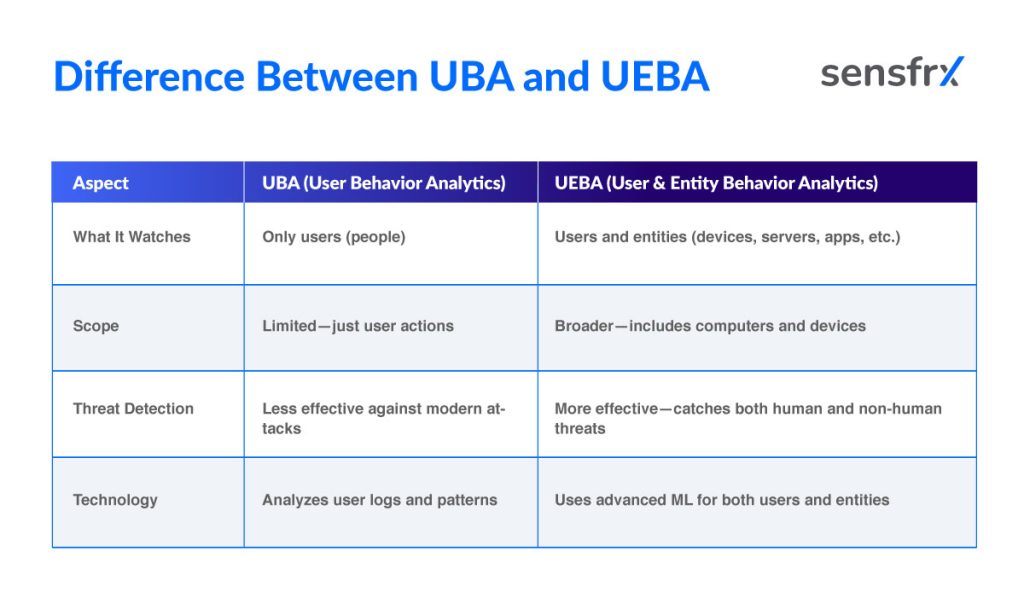
UBA watches what people do. UEBA adds machines and applications, which is where attacks that target devices rather than users show up.
Why UEBA matters now
- Attacks target people and devices at once. A phishing email takes a password; a compromised printer or IoT device moves data out. Tools that look for known malware or network anomalies miss both when the activity looks normal on the surface.
- It catches insiders and hijacked accounts. Unexpected logins and large transfers from a valid account raise no standard alarm. UEBA raises one because the pattern is wrong for that account.
- Alerts come from context, not thresholds. A user downloading more than they ever have is an alert even if the volume is small in absolute terms, because the baseline is per person and per device.
- Shorter time to detect. Finding the anomaly on day one instead of month three is the difference between a contained incident and a breach notification.
How UEBA works
Three stages: collect, baseline, compare.
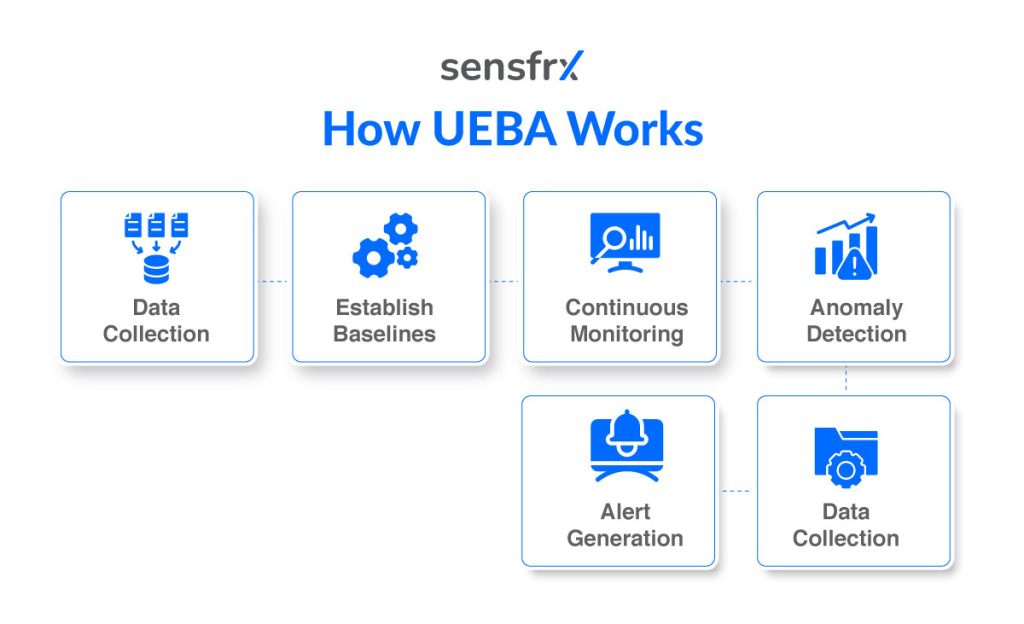
Data sources
UEBA builds its picture of normal from several feeds:
- Users: login records, access logs, account changes, email activity.
- Devices: usage patterns, endpoint protection alerts, location changes, configuration changes.
- Servers: system logs, file access logs, authentication attempts, privilege changes.
- Applications: application logs, API usage, transaction history, permission changes.
- Network: flow records, connection history, failed logins, abnormal traffic.
From these it builds a behaviour profile for each user and device.
Building baselines with machine learning and statistics
Machine learning and statistical models turn the raw feeds into baselines:
- The system watches each user and device over time: login hours, locations, which files they touch, how much data they move.
- Models learn a personal baseline for each one.
- Statistical models score how common, rare or anomalous a given action is against that baseline.
- Because baselines are built per role and per entity type, the same action can be normal for one account and an alert for another.
Real-time monitoring and anomaly detection
Every new event is compared against the baseline as it happens:
- Rare or out-of-character actions for that user or device get flagged.
- Large deviations, such as a login from a new country or a data transfer far above normal, trigger an immediate alert.
- The security team gets the alert while the activity is still in progress, not in the next day's report.
Example: An out-of-pattern download and login
An employee normally downloads a few megabytes a week from one location. Then:
- The account downloads gigabytes of files, and
- It logs in from a foreign country.
Both break the user's baseline, so UEBA scores the session high.
- An alert goes to the security team.
- They investigate while the session is live, which is early enough to stop the exfiltration.
What UEBA tools do
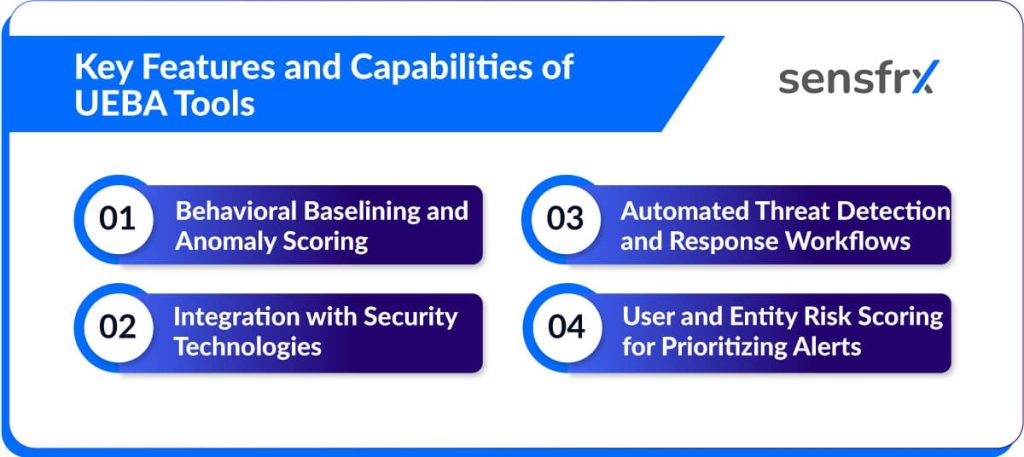
1. Behavioural baselining and anomaly scoring
- Build a baseline from the typical activity of each user and entity (machines, applications, devices).
- Score each new action by how far it departs from that baseline.
2. Integration with the rest of the security stack
- SIEM: UEBA adds behavioural context to SIEM events, which improves detection accuracy.
- IAM: Identity data correlated with behaviour tightens access control and speeds response.
- DLP: UEBA spots abnormal data access and exfiltration patterns that DLP content rules miss.
3. Automated detection and response
- Correlate high-risk behaviours into a single incident rather than a pile of anomalies.
- Trigger workflows that contain the risk: lock the account, alert the team, open an investigation. Dwell time drops because nobody waits for a human to read the alert.
4. Risk scoring to rank alerts
- Every user and entity carries a running risk score built from current and past behaviour.
- Analysts work the highest scores first, and low-score noise stays out of the queue.
Those four capabilities, plus integration with the tools around them, are what make a UEBA platform useful rather than another source of alerts.
UEBA use cases
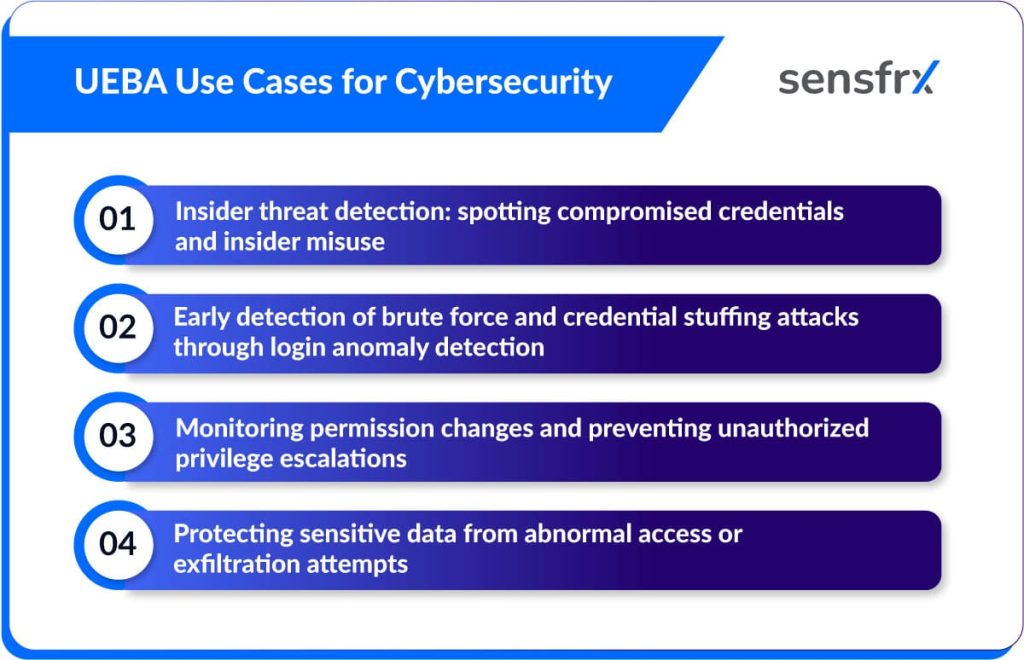
1. Insider threats: compromised credentials and insider misuse
Insider threats are not always malicious employees; often a legitimate account has been taken over from outside. Verizon's 2024 Data Breach Investigations Report put the human element in 74% of breaches, stolen credentials and insider misuse included.
A finance employee's credentials are phished. The attacker logs in after hours from an unfamiliar location and starts a wire transfer. Login time, device and geolocation all break the baseline, and the transfer is flagged before the funds move.
2. Brute force and credential stuffing caught at the login
Credential stuffing replays username and password pairs from past breaches against your login, betting that people reuse passwords. IBM's Cost of a Data Breach 2024 report put the average time to detect a credential stuffing incident at 291 days and the cost at around $4.7 million.
An ecommerce site sees 500 failed logins in one minute, then successful logins from IPs linked to botnets. Blocking at that point stops the account takeovers that follow. See credential stuffing for the attack in detail.
3. Permission changes and privilege escalation
An insider, or an attacker holding stolen credentials, will try to raise their privileges to reach sensitive systems. Privilege abuse is a leading factor in insider incidents, so role changes need watching.
A support account gains database admin rights with no approval request behind it. That is either misuse or a compromised account. Just-in-time (JIT) access and automated alerts on role changes close the window.
4. Abnormal data access and exfiltration
Valid credentials do not make a download legitimate. Insider data theft usually looks like bulk copying, access outside the person's normal scope, or data pushed out by email or cloud storage. Ponemon Institute's 2023 Insider Threat Report found 60% of insider incidents involve data theft.
An HR employee downloads hundreds of salary records overnight, far outside their pattern. UEBA flags the session and the exfiltration can be stopped before the files leave.
UEBA tools to compare
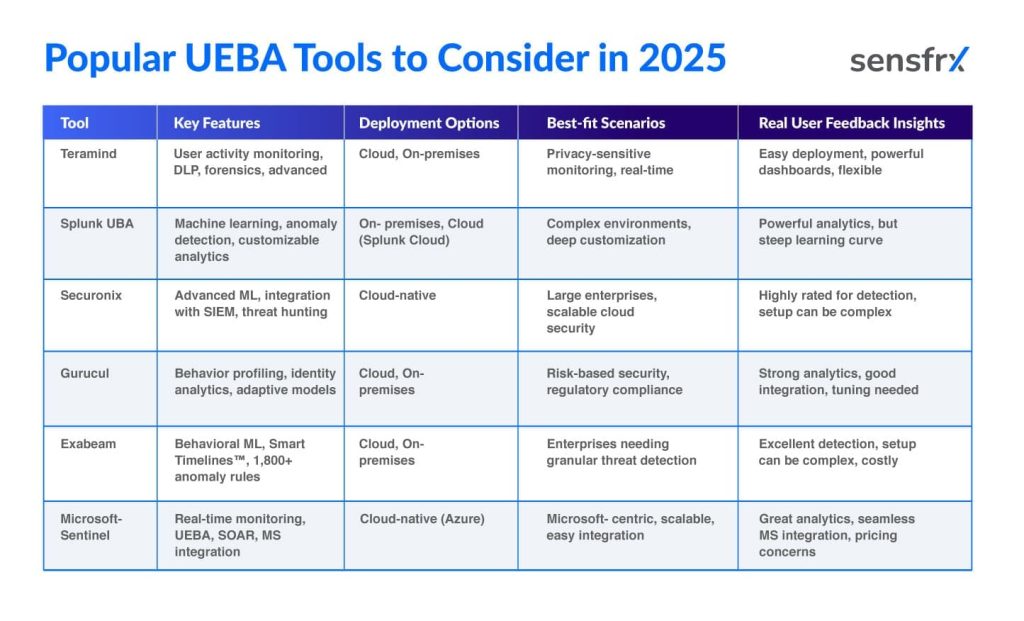
The right UEBA tool depends on your environment: the data sources you can feed it, the SIEM and IAM it must integrate with, and whether your main worry is insiders, credential abuse or data loss.
The table compares Teramind, Splunk UBA, Securonix, Gurucul, Exabeam and Microsoft Sentinel on features, deployment options, best-fit scenarios and user feedback on performance and usability.
How to implement UEBA
Four stages, each with a short checklist.
1. Plan data integration and coverage
- List every data source: identity management, endpoints, network devices, servers, applications.
- Work out what each source can give you: activity logs, authentication events, access records, flow data.
- Get IT and security to agree on secure, compliant ingestion from each one.
- Test that data flows and covers the segments that matter, then re-check coverage every time the infrastructure changes.
2. Define objectives from your own risk priorities
- Get business leaders and risk owners to name the top threats: insider theft, unauthorised access, data loss.
- Turn each into a measurable UEBA use case: "detect abnormal after-hours logins", "flag mass downloads".
- Set success metrics: detections per month, risk events reduced, time to resolve.
- Check the objectives against regulatory and compliance needs, and revisit them when priorities shift.
3. Tune the models to cut false positives
- Watch the first weeks of alerts and risk scores for recurring false positives.
- Collect analyst notes on which alerts were benign and why.
- Rebuild baselines from recent legitimate activity: peer groups, access patterns, thresholds.
- Work with the vendor on anomaly parameters, and repeat the cycle as work patterns and attack techniques change.
4. Train the team to read and act on alerts
- Teach how the platform scores risk and generates alerts.
- Run simulated incidents so analysts learn what a real threat looks like against noise.
- Write investigation playbooks per alert type and assign who acts on each.
- Refresh the training when new rules, capabilities or alert types land.
Challenges in UEBA deployment
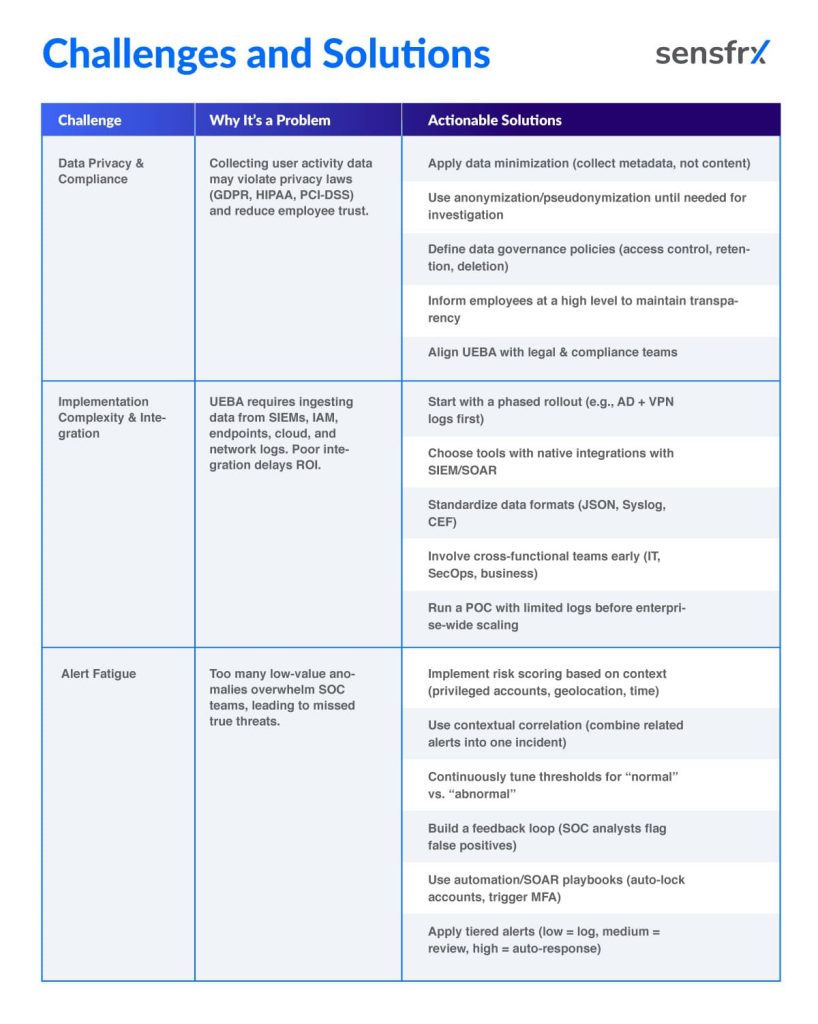
Three problems come up in most deployments, each with a known fix.
1. Data privacy and compliance
UEBA collects detailed user activity: logins, email, file access, device behaviour. That raises privacy and regulatory questions under GDPR, HIPAA and PCI-DSS, and collecting more personal data than you need adds legal risk.
How to handle it:
- Minimise the data. Metadata over full content wherever the detection still works.
- Pseudonymise identifiers and unmask only inside an investigation.
- Write the governance. Who sees behavioural data, how long it is kept, when it is deleted.
- Tell employees that monitoring exists, at least in outline.
- Check configurations with legal and HR against the regulations that apply to you.
Concrete step: role-based access on the UEBA dashboards so only the SOC and incident response teams can see user-level data.
2. Integration complexity
UEBA is not plug and play. It needs the SIEM, IAM, network logs, cloud apps and endpoint monitoring wired in, and hybrid or multi-cloud estates make that harder.
How to handle it:
- Start small. Begin with critical systems such as Active Directory and cloud storage.
- Use native integrations. Pick a tool that already connects to your SIEM and SOAR.
- Standardise log formats. JSON, Syslog or CEF ingest cleanly; bespoke formats do not.
- Bring IT, security and the business in early so data sources and expectations line up.
- Automate collection and correlation instead of mapping logs by hand.
Concrete step: a proof of concept on a limited dataset, VPN plus AD logs for example, before rolling out across the enterprise.
3. Alert fatigue
A UEBA system can raise thousands of anomalies a day. Untuned, it buries the SOC, and the one alert that matters goes unread.
How to handle it:
- Rank by risk score. A privileged user logging in from a new country at 2 AM outranks a standard user's odd login.
- Correlate. Several low-level anomalies on one entity become one high-confidence incident.
- Tune thresholds. "More than 5 failed logins in 1 minute" rather than "any failed login".
- Close the feedback loop. Analysts mark true and false positives and the models learn from it.
- Automate the response with SOAR playbooks: temporary lockout, MFA challenge.
Concrete step: tier the alerts.
- Tier 1: low-risk anomalies, logged for audit only.
- Tier 2: medium-risk, SOC review.
- Tier 3: high-risk, automated containment.
The table sums up the challenges and their fixes:
Where UEBA is heading
1. Baselines that retrain themselves
Early UEBA ran on static baselines and fixed statistical models. The direction now is adaptive analytics that learn from new data continuously, adjust their own baselines and track changing attack techniques, which cuts manual rule tuning and catches quieter insider activity and zero-day tactics.
Gartner predicted that 60% of organisations would be using AI-driven behavioural analytics to detect insider and credential-based threats by 2026.
What that gives you:
- Faster, more accurate anomaly detection.
- Fewer false positives, because the model learns context.
- Adaptation to new threats without a human retuning rules.
2. Deeper ties to threat intelligence and SOAR
UEBA platforms are moving out of isolation. Threat intelligence feeds let them match user behaviour against known malicious IPs and domains; SOAR integration lets them act on what they find. An alert arrives enriched with outside context and the containment is already under way.
The Ponemon Institute found 70% of SOC teams face burnout from repetitive manual investigation, which is the workload this removes.
What that gives you:
- Alerts that combine internal anomalies with external intelligence.
- Faster containment through SOAR: lock accounts, kill sessions, trigger MFA.
- Less repetitive work for analysts.
3. UEBA inside autonomous response
As defence moves toward automation, UEBA supplies the behavioural context that triggers it. Rather than wait for an analyst, the system applies adaptive controls on its own: step-up authentication, temporary access limits, network isolation, before the threat spreads.
Gartner estimated that 40% of large enterprises would adopt autonomous security solutions integrated with UEBA by 2027.
What that gives you:
- Near real-time containment of insider and credential-based attacks.
- Lower mean time to detect (MTTD) and respond (MTTR).
- Operations continue while the response runs, with no wait for a human.
Where to start
UEBA finds the attacks that pass every credential check: the insider, the hijacked account, the quiet exfiltration. It does that by knowing what each user and device normally does and scoring every departure from it in real time.
Treat it as one layer in a stack, not a standalone fix, and pick the platform that fits your data sources, your SIEM and your top two risks. First step: pick one use case from the four above, feed the system the logs that use case needs, and run it for a month before you widen the scope. If the accounts you are protecting are customer logins rather than employee ones, the same behavioural scoring applies; see account takeover protection.