How to deal with web hosting fraud
Common web hosting scams, from fake domain renewals and spoofed registrar emails to oversold servers and shared-IP blacklisting, and what to do about each.
 By 12 mins readPublished Updated
On this page
Web hosting fraud takes two forms. On one side, scammers target site owners with fake domain renewal notices, spoofed registrar emails and hosting plans that promise resources the server does not have. On the other, hosting providers get hit with signups on stolen cards, free-trial abuse and phishing kits deployed on the servers they rent out. Both cost money, uptime and reputation, and both are easier to stop once you know what they look like.
What is web hosting fraud?
Hosting is where a website lives; the domain is how people find it. Fraud in this space is any scam that uses that relationship to take money or access: a renewal notice from a registrar you never used, a plan sold as unlimited that throttles at the first traffic spike, a host that quietly sells your visitors' data, or the blacklisting that lands on your IP when a shared-server neighbour starts spamming.
The industry keeps moving toward cloud plans, with more attention to security and to greener hosting. The scams move with it.
Why fraud awareness matters
Most hosting scams work because the target does not know the pattern. Once you know that registrars do not send renewal invoices from unfamiliar domains, that notice goes in the bin.
Knowing the patterns lets you recognise the threat, keep credentials and card details to yourself, and make the buying decision with your eyes open.
Common types of web hosting scams
Each scam below hits security, performance or cost. These are the ones you will meet most often.
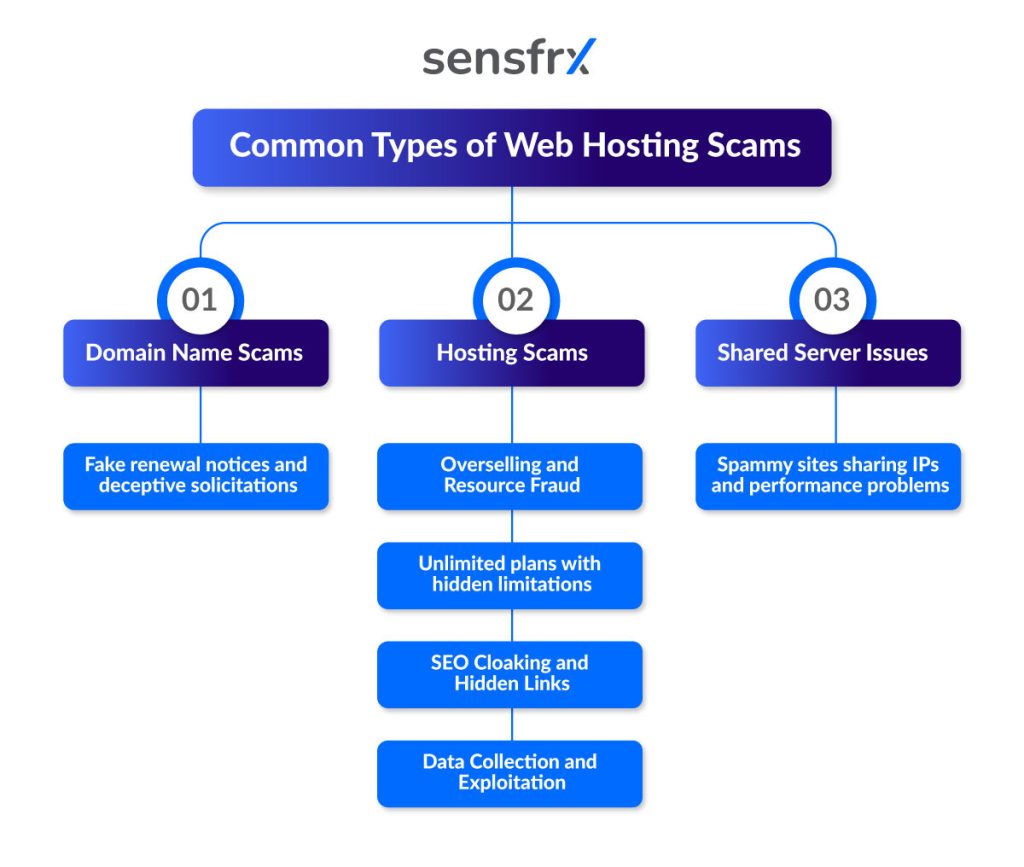
1. Domain name scams
Domain scams aim at the owner's wallet or login. The two main ones:
Fake renewal notices and deceptive solicitations
A letter or email styled as an official registrar notice tells you your domain is about to expire and asks for a renewal fee. The language is urgent and the deadline is close.
Pay it and you have bought nothing, or worse, you have signed a transfer that moves the domain to the scammer's registrar.
How to spot it:
- Read the sender address character by character; lookalike domains add a letter or swap one.
- Check the renewal date by logging in to your registrar directly, never through the email.
Turn on two-factor authentication on the registrar account, ignore notices you did not expect, and ask your registrar's support if one looks real.
Spoofed emails pretending to be your registrar
The email looks like it came from your registrar and says there is a problem with the account, or that you must update your details. The link leads to a credential-harvesting page.
A successful one hands over the account, the payment details on it, and the domain.
How to spot it:
- Urgent or alarming wording that pushes you to click now.
- Links whose real destination, shown on hover, differs from the registrar's domain by a letter or two.
Type the registrar's URL yourself rather than following links, use a unique password, and keep two-factor authentication on.
2. Hosting scams
These cost you performance, data or money after you have signed up.
Overselling and resource fraud
Overselling is selling more server capacity than the machine has, on the bet that most customers will not use their share. It becomes fraud when the promised resources are never there and the service degrades.
Sites on oversold servers load slowly, go down often, and fall over during the traffic peaks when they matter most.
How to spot it:
- Read reviews for complaints about uptime and performance under load.
- Track your own load times, CPU and memory; if they swing or degrade without a change on your side, the host is the cause.
Pick hosts that publish how they allocate resources, and move to dedicated resources rather than a shared plan if your traffic is high.
Unlimited plans with hidden limitations
Plans sold as unlimited bandwidth, storage or resources carry limits in the terms of service: caps on CPU time, on inodes (the number of files), on "fair usage".
Cross a hidden line and the host throttles the site, suspends the account or adds charges, often without warning.
How to spot it:
- Read the terms of service and acceptable use policy for "fair usage", "CPU usage limits" and "inode limits".
- Ask the host, before you pay, what the caps on CPU, memory and storage are.
Treat "unlimited" as a marketing word. A cheap plan with specific, published limits beats one that promises everything.
SEO cloaking and hidden links
Cloaking shows search engine crawlers one page and human visitors another, to game rankings. Hidden links are links buried in the source or styled to look like plain text, used to inflate a backlink profile or to spam other sites. Both can turn up on your site without your knowledge after a compromise.
The cost of hidden links:
- Search engine penalties: hidden links break the guidelines, like cloaking, and bring ranking drops or removal from results.
- A worse user experience: accidental clicks and higher bounce rates.
How to spot them:
- Use a tool such as the Googlebot simulator to compare what crawlers see with what visitors see.
- Check how your pages appear in search results against what is on the page.
- Inspect the page source for anchor tags or CSS you did not put there.
Data collection and exploitation
A host, or a third party with access to its servers, can collect data from the sites it hosts without telling the owner: visitor information, behavioral analytics, personal details, then use it for ad targeting or sell it on.
That breaks your users' privacy, can put you in breach of GDPR or CCPA, and costs you their trust when they find out.
How to spot it:
- Read the host's privacy policy for clauses on sharing data with third parties.
- Run your own analytics and compare it with whatever the host reports; gaps are a question to ask.
Choose hosts with clear data protection terms and no data collection of their own where you can, serve everything over HTTPS, and keep your analytics and visitor data under your control.
3. Shared server issues
On a shared server your site shares an IP address with strangers. When one of them sends spam or hosts malware, the IP's reputation suffers, and so do your email deliverability and search ranking.
Rankings drop, mail lands in spam folders, and the site looks less credible once the IP is flagged.
How to spot it:
- Check the IP in Google Safe Browsing or MX Toolbox to see whether it has been flagged for spam.
- Watch for unexplained drops in rankings or performance; they often trace back to the IP.
Ask for a dedicated IP, or move to a VPS or dedicated server so you no longer share with sites you cannot vet.
Spammy sites sharing IPs and performance problems
The two costs of shared hosting are reputation and resources. A spammy neighbour gets the IP blacklisted; a busy one eats the CPU and memory you were counting on.
Red flags and warning signs
The clearest tell is a price that makes no sense. Unknown providers use rock-bottom plans to collect payments for services that are poor or do not exist.
Suspiciously low prices
A plan priced far below the market looks like a bargain and often ends with the provider vanishing, or delivering next to nothing, once paid.
Watch for:
- Prices far below market value.
- Deals that could not be delivered at that price.
- Limited-time offers built to rush you.
Pressure to act urgently
Urgency is how scammers stop you from checking. Limited spots, exclusive deals that expire tonight, warnings of what happens if you wait: all of it is there to make you pay before you think.
The usual devices:
- Countdown timers.
- "Limited time offer" and "Act now before it's too late".
- Threats of consequences if you do not act at once.
Unfamiliar sender information
A message claiming to be from your host but sent from an address you do not recognise is a scam until proven otherwise. The address will be close to the real one, the request urgent, and the ask is credentials or a payment.
Check for:
- Sender addresses that do not match the company's official domain.
- Small misspellings in addresses or URLs.
- Social profiles with few followers or missing details.
Hidden or unauthorized site modifications
Changes to your site that you did not make point to a breach: unexpected redirects, pop-ups, ads you did not place, or a design or content change out of nowhere.
Look for:
- Configuration changes you did not make.
- New files or scripts in the site directory.
- Unusual outbound network traffic.
How to detect fraudulent hosting practices
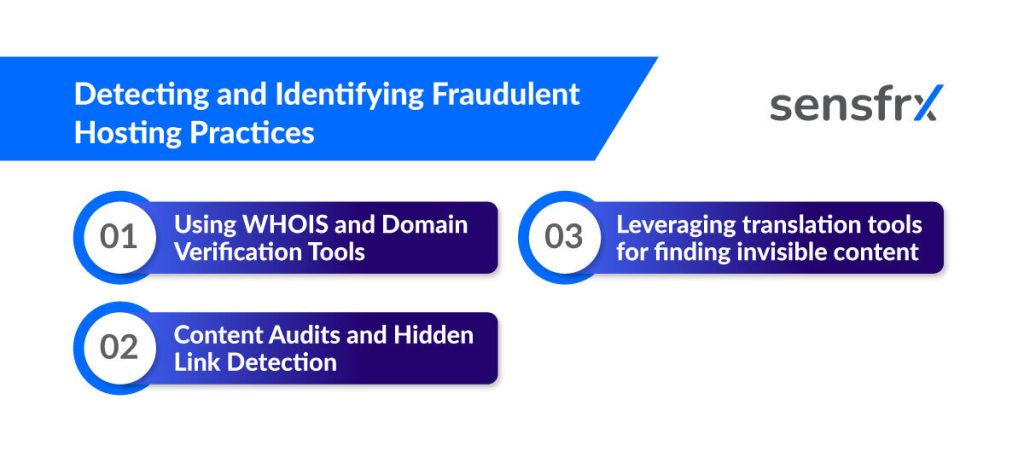
Three checks catch most of it: who owns the domain, what is in your content, and what the hidden text says.
1. Using WHOIS and domain verification tools
WHOIS is the public record of domain registrations, overseen by ICANN: who registered a domain, how to contact them, and when it was registered and expires.
Use it on any provider or sender you do not know. A registrar "notice" from a domain registered last month is a scam. Many records now show a privacy proxy rather than the owner, but the registration date and the registrar still tell you plenty.
A WHOIS lookup also shows your own domain's expiry date, so you can watch it and renew on time rather than react to a fake notice.
2. Content audits and hidden link detection
A content audit is an inventory of every page and file on your site. For fraud purposes the question is simple: is there anything here I did not publish?
Pages you do not recognise, old posts with new outbound links, and scripts added to templates are the usual finds, and each one is a lead.
Hidden links are the hard part because they are built not to be seen: styled as plain text, set to the background colour, or positioned off-screen. Look in the source, not the rendered page.
3. Using translation tools to find hidden content
Injected content is often in a language the site owner does not read, which is part of why it stays hidden. Spam pages and hidden text for pharmaceuticals, gambling or counterfeit goods can sit on a site unnoticed.
Run any text you do not recognise, in your pages or in your search results, through a translation tool. If it is selling something you do not sell, you have found the injection, and possibly a phishing or malware distribution point as well.
What to do when you find hosting fraud
Fraud at your host disrupts the business and exposes data. This is the order of operations.
Immediate actions to take
Act the day you find it. The longer a fraudulent host has your site and your card, the more it costs. Two things to do: report it, and move.
Reporting fraud to hosting authorities and regulatory bodies
Reporting is how the next person avoids the same scam, and it builds the record you need for a refund or chargeback.
Start with the provider itself, even if you think they are the problem:
- Keep every message exchanged with them.
- Ask for a written explanation of each suspicious charge or action.
- Request a refund for overcharges or service not delivered.
Switching to a reputable hosting provider
Once reported, move the site. Do it with care; a rushed migration loses data and uptime.
Take the time to choose the next host:
- Read reviews from several sources, not the host's own page.
- Prefer providers with a long record.
- Check the uptime guarantee and how support is reached.
Best practices for reporting and sharing experiences
What you learned is worth something to the next owner.
Encouraging community protection
Write up the scam where other site owners will see it: the forum for your platform, a review of the provider, a report to the registrar or regulator. Name the sender domain and the tactic.
Read the same sources. Fraud patterns repeat, and the one that hits you next quarter has been described by someone already.
Best practices for scam prevention
Three habits cover most of the risk: someone owns security, the site gets audited on a schedule, and you only buy from providers you have checked.
Professional oversight
Give one person or team the job of watching the site's security and keeping the controls in place. That can be an IT specialist on staff or a security firm you retain.
Why it matters:
- Expertise: they have seen the patterns and know what to fix first.
- Objectivity: an outside view catches what you have stopped noticing.
- Compliance: they keep you inside the laws and standards that apply.
Regular security audits
Audit on a schedule, with a qualified third party, and cover server settings, software versions, firewalls and SSL certificates. The aim is to find the hole before a scammer does.
What audits buy you:
- Early detection: weaknesses found before they are used.
- Compliance: evidence that you meet the standards you are held to.
- Steady improvement: each audit raises the floor.
Trusted service providers
Buy hosting from companies with a track record of secure service and firm fraud prevention policies. Research them before you sign, and read what other customers say about reliability.
What a trusted provider gives you:
- Lower risk: established security controls.
- Expertise: specialist knowledge and resources.
- Reliability: service quality that holds up over time.
Where Sensfrx fits for hosting providers
Sensfrx sits on the other side of this problem. If you run a hosting company, the fraud you see is customers who are not customers: signups on stolen cards, free-trial accounts that become phishing hosts, and takeovers of real clients' accounts. Sensfrx scores every signup, login and payment in real time from device, network and behavior signals, and your rules turn the score into allow, review or block.
It plugs into WHMCS, Blesta and WISECP, with a REST API for anything else, so high-risk orders are flagged at checkout instead of after the abuse report arrives.
For site owners, the controls above are the job: multi-factor authentication on the registrar and host accounts, access logs reviewed, SSL certificates current, and a host chosen on evidence.
There is a free plan to start with; integration questions go through the contact page.
Where to start
Start with the two accounts that matter most: the registrar and the host. Put two-factor authentication on both, confirm the domain's real expiry date, and from then on treat every renewal or account notice that arrives by email as suspect until you have checked it by logging in directly.
Then audit the site for content you did not publish, check the server IP's reputation, and read the terms of any "unlimited" plan you are on.
When you do get hit, document it, report it to the provider and the registrar, and write it up where other owners will see it.