Spear phishing is a targeted attack in which personalized messages trick a specific person or organization into giving up sensitive information or clicking a malicious link.
Spear phishing: How attacks work, real cases and how to stop them
What spear phishing is, the five-step attack process, the RSA, Ubiquiti and Google/Facebook cases, and the controls and tools that stop it.
 By 9 mins readPublished Updated
On this page
- What is a spear phishing attack?
- How a spear phishing attack works, step by step
- Spear phishing examples
- Spear phishing vs. Whaling
- Spear phishing prevention: Best practices for businesses and employees
- Top tools and technologies to protect against spear phishing
- How to respond if you fall victim to a spear phishing attack
- Where to start
- Frequently asked questions
Spear phishing is a phishing attack aimed at one person or one company. The attacker researches the target, impersonates someone the target trusts, and asks for one specific thing: credentials, a wire transfer, an opened attachment. Generic phishing is sprayed at millions and filtered by volume; spear phishing is written for you, which is why it gets through.
Phishing research puts spear phishing at less than 0.1% of global email traffic and behind two-thirds of successful security breaches. The money follows the same curve: the average phishing-related breach costs nearly $5 million, and a single spear phishing campaign has reached $100 million.
What is a spear phishing attack?
A spear phishing attack is a targeted email scam in which the attacker impersonates someone the victim trusts, such as a boss, colleague or supplier, to get them to click a malicious link, hand over login credentials or send money.
The classic version: an employee gets an email that appears to come from the CEO, with the right name and signature, asking for an urgent wire transfer for a confidential deal.
The message applies pressure: pay now, or there will be consequences. It reads as genuine because the attacker has already learned the employee's role and the company's reporting lines.
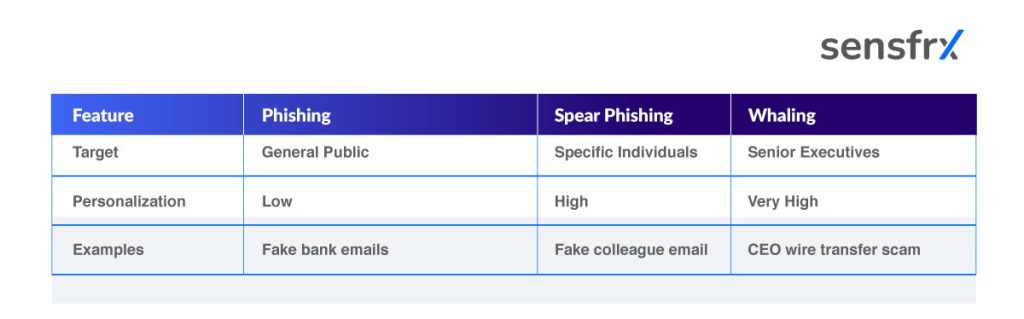
Spear phishing is often confused with ordinary phishing and with whaling. The table below separates the three:
How a spear phishing attack works, step by step
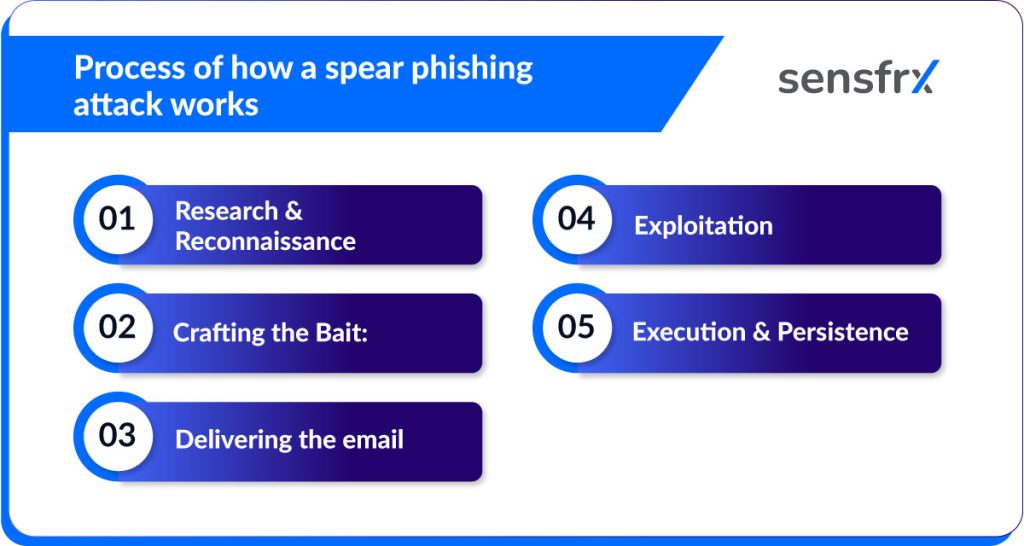
Five stages, each building on the last:
Step 1: Research and reconnaissance
The attacker collects personal and company details from social media, the corporate website, press releases, online databases and LinkedIn.
Example: From LinkedIn and Facebook the attacker learns an employee's title, a current project and the names of colleagues. That is enough to know who reports to whom and what tone to use.
Step 2: Crafting the bait
With that material, the attacker writes a personalized email as a trusted contact: a manager, a vendor, IT support.
Example: The email appears to come from the employee's boss. It references a real project ("Hi Priya, regarding the Q3 audit report…"), uses the usual greeting, may copy the boss's writing style, and asks for an urgent review of the attached "audit document".
Step 3: Delivering the email
The email lands. Because it is relevant and familiar, the recipient clicks or opens without a second look.
Example: The employee opens the attachment or clicks through to view "audit results". A company logo and the right internal vocabulary remove any remaining doubt.
Step 4: Exploitation
The click steals credentials, installs malware or diverts money.
The outcome is one of three:
- Credential theft, through a fake login page
- Malware, from a booby-trapped attachment
- A fraudulent payment, after payment details are shared
Example: The attachment installs a keylogger that captures every login. If it was a link, it opens a clone of the company's Office 365 sign-in page and forwards the typed password to the attacker.
Step 5: Execution and persistence
With credentials or a foothold on the network, the attacker escalates: lateral movement, file exfiltration, more malware, or straight financial theft.
Example: Using the stolen login, the attacker reads confidential client files, phishes colleagues from the compromised mailbox, or sells the credentials on the dark web. Some stay quiet inside the network for months.
Spear phishing examples
Three cases, each with the controls that would have stopped it.
RSA attack (2011)
Attackers sent RSA employees a malicious Excel file. The breach that followed compromised the company's security tokens.
Lessons and what to do about them:
Treat routine attachments as hostile. An Excel file from an unexpected sender is a payload until proven otherwise. Scan attachments automatically and put a visible warning banner on any email carrying an unexpected one.
Limit how far privilege spreads. The attackers moved laterally by harvesting and escalating credentials. Least-privilege access, network segmentation and regular review of permissions and access logs keep one compromised endpoint from becoming the whole network.
Detect in real time. The tooling of the day did not react fast enough. Continuous monitoring and behavioral analytics for internal users, with UEBA tools, automated alerting and a tested response plan, close that gap.
Communicate fast and openly. RSA's early disclosure to customers limited the damage; other organizations have delayed or hidden details and paid for it. Keep a pre-approved breach communication plan and train staff on who to notify.
Ubiquiti networks (2015)
Spoofed emails from "executives" led finance staff to wire $40 million to attacker-controlled accounts.
Lessons and what to do about them:
Require multi-step approval and out-of-band verification. No urgent email, even from an apparent executive, should move money on its own. Mandate a phone or video call for payment requests, above all for new accounts or large sums.
Train for social engineering, not just malware. This scam needed no technical exploit. Scenario-based training and simulated phishing aimed at finance teams and executive assistants teach people to recognize pressure tactics and escalate.
Authenticate your email. Missing SPF, DKIM and DMARC made spoofing trivial. Enforce all three on inbound and outbound mail and watch for lookalike domains.
Google and Facebook invoice scam
Posing as a hardware vendor, criminals diverted $100 million from the two companies over several years.
Lessons and what to do about them:
Two people on every payment. Invoices, bank detail changes and new vendors need dual review and sign-off. Build the multi-level approval into the payment workflow so it cannot be skipped.
Verify payment requests independently. Never confirm a bank account change through the same email thread that requested it. Keep documented vendor phone numbers and a callback policy with an escalation path.
Keep training current. Technically capable staff were fooled. Refresher training for finance, procurement and IT should cover the current tricks: domain impersonation and forged documents.
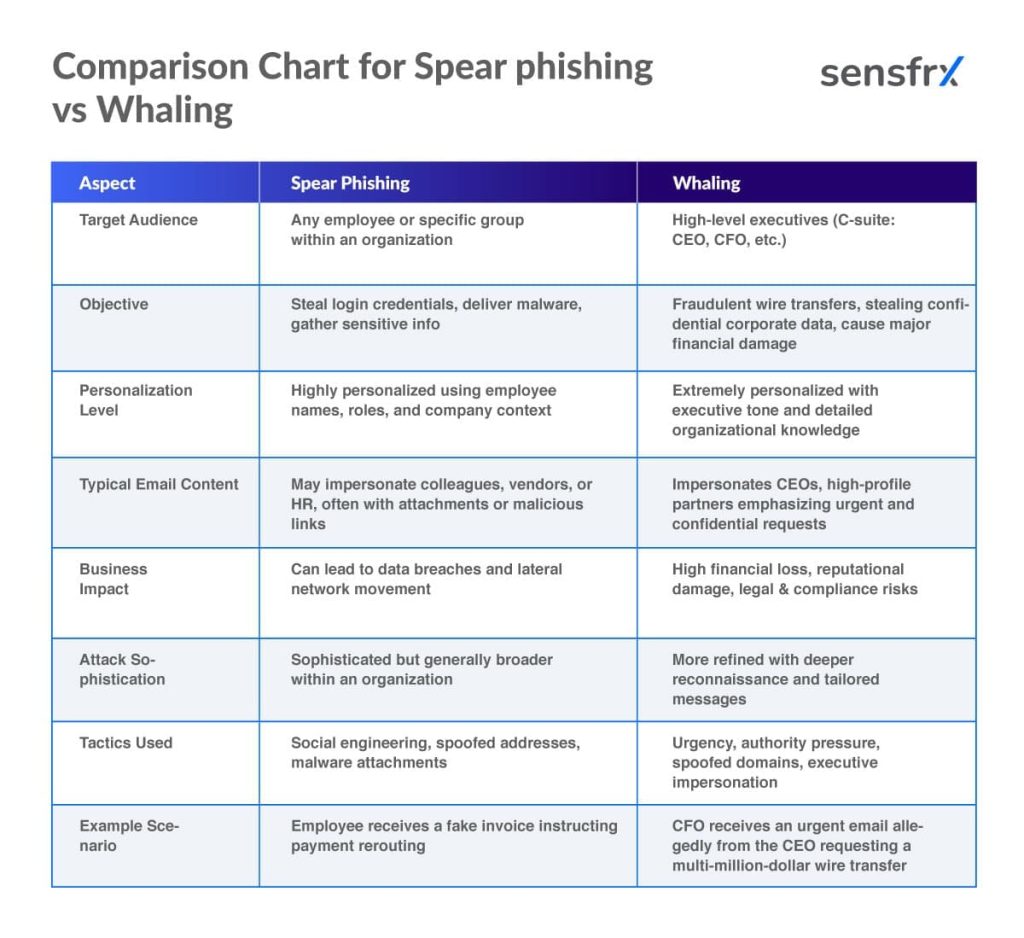
Spear phishing vs. Whaling
Whaling is spear phishing aimed at the C-suite: CEOs, CFOs and COOs, chosen because they can authorize the largest transfers. The research goes deeper, drawing on social media, company websites and even video footage of the target.
The resulting messages impersonate trusted executives or business partners and aim to get a large transfer approved, sensitive corporate data released or an unauthorized transaction signed off.
The Australian hedge fund Levitas Capital was hit with a whaling attack in which a co-founder clicked a fake Zoom meeting link. Malware followed, then takeover of the email system, fraudulent invoice payments, an $800,000 loss and, in the end, the firm's closure.
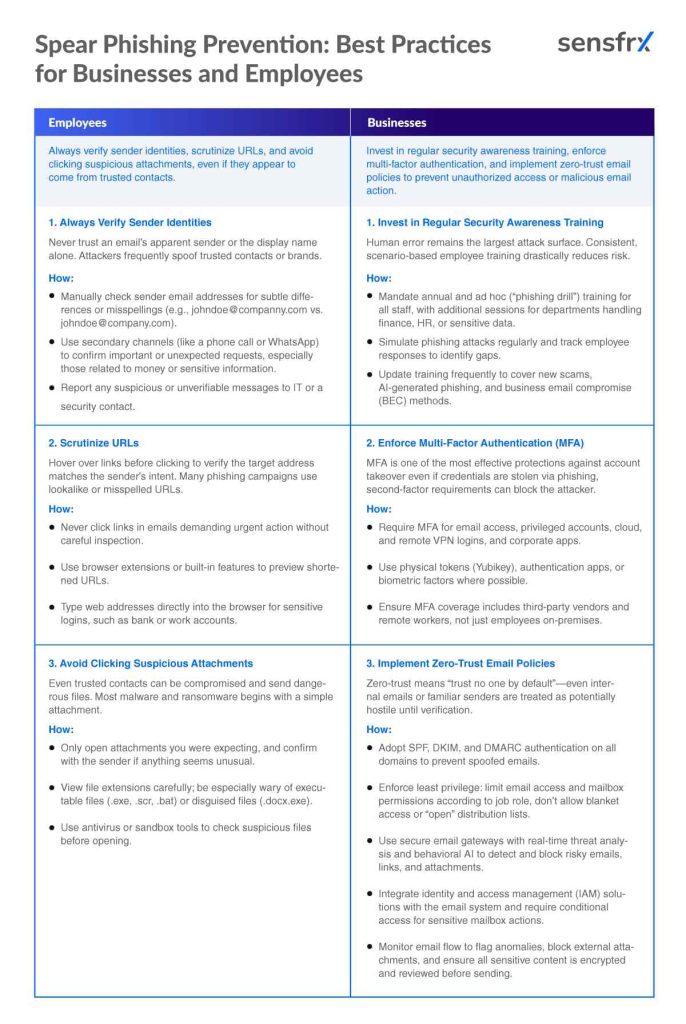
Spear phishing prevention: Best practices for businesses and employees
The checklist below splits the work in two: the controls the company owns, and the habits each employee needs.
Top tools and technologies to protect against spear phishing
- Email security gateways: Proofpoint, Mimecast
These filter mail at the perimeter, using sandboxing and threat intelligence to stop malware, phishing and impersonation before it reaches an inbox.
They handle spear phishing and business email compromise attempts automatically, before a person has to decide.
- Spam filters and AI detection
Automated filters score sender reputation, patterns and wording, and adaptive AI models keep up with new phishing techniques better than static rules.
No filter catches everything. When a phish does land and the password is typed into a fake page, the next stop is your login form. Sensfrx scores that login from device, network and behaviour signals, so a correct password arriving from an unfamiliar device and network is challenged or blocked instead of waved through.
- Multi-factor authentication (MFA)
MFA asks for something beyond the password: a code, a token or a biometric. When a password is phished, MFA blocks the login unless the attacker also holds the second factor.
- DMARC, DKIM, SPF
These protocols verify that a message came from the domain it claims. Configured and enforced, they cut off straightforward spoofing and let receiving servers drop forged mail before delivery.
- Security awareness platforms: KnowBe4, Cofense
These run ongoing training and simulated phishing so staff learn to recognize, avoid and report suspicious email. The result you can measure is a falling click rate and a rising report rate.
How to respond if you fall victim to a spear phishing attack
Immediate steps first, then the longer work.
Immediate steps
1. Report it to IT or security. Early reporting lets the team size the scope, isolate affected systems and cut off the attacker before access escalates.
2. Reset every credential. Passwords and access tokens for the victim's email, corporate accounts, cloud services and anything connected. Strong unique passwords plus MFA keep the same attacker from walking back in.
3. Scan the endpoints. Run antivirus or EDR with current definitions on the affected machines to find and remove keyloggers, trojans and backdoors before data leaves.
Long-term response
1. Fix the incident response plan. Use what the incident taught you to tighten escalation paths, roles and responsibilities, then drill the plan so the next response is faster.
2. Train on the specific scenario. Add the attack you just saw to the awareness program and run simulated phishing built on it.
3. Analyze the attack path. Work out the technique, the vulnerability and the process gap it used. That decides what changes: stronger filtering, better threat intelligence or new vendor verification steps.
4. Support the people affected. Victims may need technical help, guidance on identity theft or plain reassurance. Clear communication keeps them cooperating and keeps the disruption short.
Where to start
Spear phishing beats technical controls by going through a person, so the fix has two halves: controls that remove the easy wins (email authentication, MFA, dual approval on payments) and people who verify before they act.
Make sender and URL checks, out-of-band confirmation of payment requests and fast reporting the normal way of working rather than an annual training topic.
When a phish still succeeds, the stolen password gets used at a login. [Sensfrx](/) scores every login from device, network and behaviour signals and lets your rules challenge or block the ones that do not look like the account owner.
Start on the free plan and have the login check in place before the next campaign lands.
Frequently asked questions